

C++ SDK
Official C++ SDK for LicenseSeat. Add license validation to native applications, Unreal Engine games, and VST/AU audio plugins.

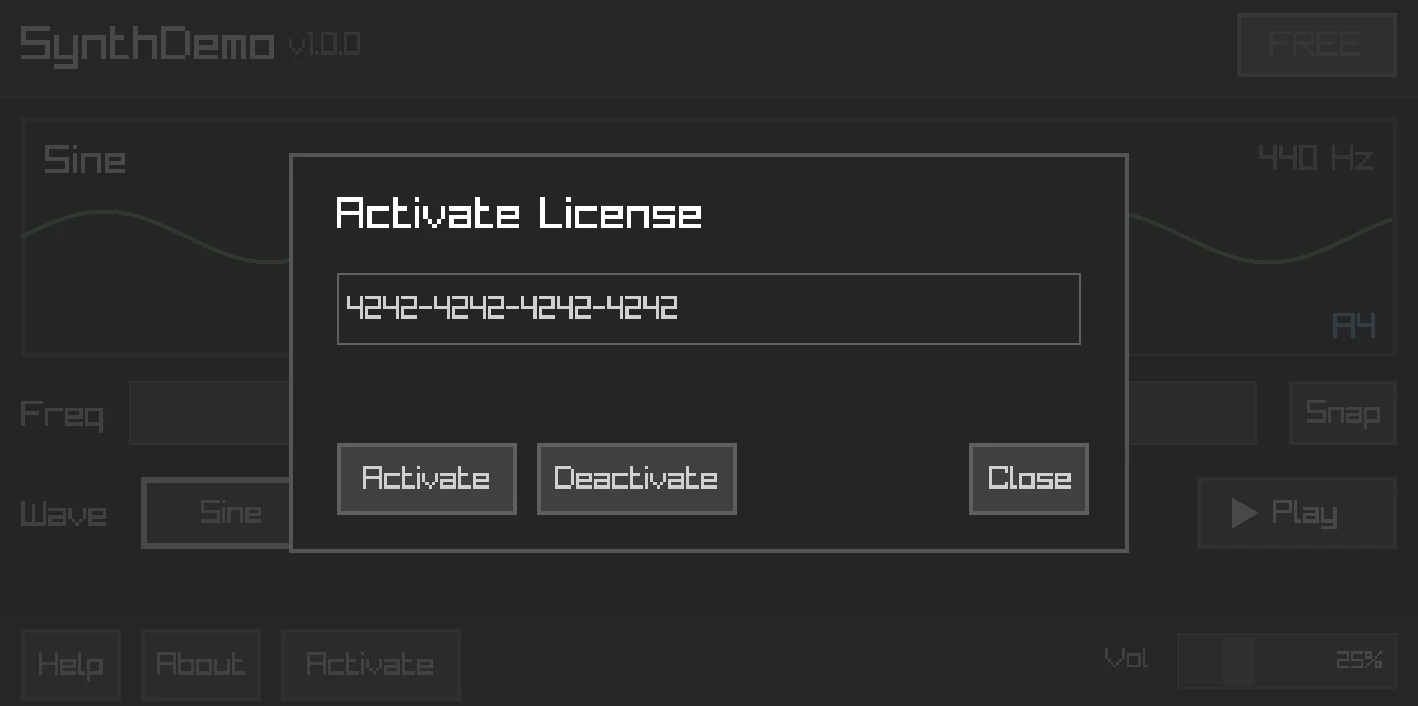
SynthDemo: FREE tier with PRO feature gating and license activation
Building a VST plugin or Unreal game? We provide a single-header JUCE integration and an Unreal Engine plugin with zero external dependencies.
Features
- License activation & deactivation - Automatic device fingerprinting
- Online & offline validation - Fingerprint-aware validation with signed offline artifacts
- Machine files - AES-256-GCM + Ed25519 machine files for preferred offline validation
- Entitlement checking -
has_entitlement()andcheck_entitlement() - Local caching - File-based caching with clock tamper detection
- Auto-validation - Background validation at configurable intervals
- Event system - Subscribe to license events
- Thread-safe - All public methods safe from any thread
- Exception-free - Uses
Result<T, Error>pattern
Installation
CMake (FetchContent)
include(FetchContent)

FetchContent_Declare(
    licenseseat
    GIT_REPOSITORY https://github.com/licenseseat/licenseseat-cpp.git
    GIT_TAG        v0.4.0
)
FetchContent_MakeAvailable(licenseseat)

target_link_libraries(your_target PRIVATE licenseseat::licenseseat)
Manual Build
git clone https://github.com/licenseseat/licenseseat-cpp.git
cd licenseseat-cpp
cmake -B build -DCMAKE_BUILD_TYPE=Release
cmake --build build
sudo cmake --install build
Dependencies
All bundled (no installation needed):
- nlohmann/json – JSON parsing
- cpp-httplib – HTTP client
- ed25519 – Cryptographic signatures
- PicoSHA2 – SHA-256 hashing
External (the only thing you need to install):
- OpenSSL – for HTTPS and machine-file AES-256-GCM verification in the full SDK path
# Ubuntu/Debian
sudo apt install libssl-dev

# macOS (usually pre-installed)
brew install openssl

# Windows
vcpkg install openssl
That's it. Clone and build — no other dependencies to install.
Quick Start
#include <licenseseat/licenseseat.hpp>

int main()
{
    licenseseat::Config config;
    config.api_key = "pk_live_xxxxxxxx";
    config.product_slug = "your-product";

    licenseseat::Client client(config);

    // Validate a license
    auto result = client.validate("XXXX-XXXX-XXXX-XXXX");

    if (result.is_ok()) {
        const auto& validation = result.value();
        if (validation.valid) {
            std::cout << "License is valid!\n";
            std::cout << "Plan: " << validation.license.plan_key() << "\n";
        } else {
            std::cout << "Invalid: " << validation.code << " - " << validation.message << "\n";
        }
    } else {
        std::cerr << "Error: " << result.error_message() << "\n";
    }

    // Check entitlements
    if (client.has_entitlement("pro")) {
        // Enable pro features
    }

    return 0;
}
Integration Guide
Step-by-step guide to integrating LicenseSeat into your C++ application.
1. Get Your Credentials
From your LicenseSeat Dashboard:
- API Key — Go to Settings → API Keys → Copy your
pk_live_*key (publishable, safe to embed in apps) - Product Slug — Go to Products → Click your product → Copy the slug from the URL
Note: Use
pk_*(publishable) keys in client applications. Keepsk_*(secret) keys server-side only.
2. Add the SDK to Your Project
Option A: CMake FetchContent (recommended)
include(FetchContent)
FetchContent_Declare(
    licenseseat
    GIT_REPOSITORY https://github.com/licenseseat/licenseseat-cpp.git
    GIT_TAG        v0.4.0
)
FetchContent_MakeAvailable(licenseseat)
target_link_libraries(your_target PRIVATE licenseseat::licenseseat)
Option B: Manual
git clone https://github.com/licenseseat/licenseseat-cpp.git
cd licenseseat-cpp
cmake -B build && cmake --build build
sudo cmake --install build
3. Initialize the Client
#include <licenseseat/licenseseat.hpp>

licenseseat::Config config;
config.api_key = "pk_live_xxxxxxxx";       // Your publishable key
config.product_slug = "your-product";       // From dashboard
config.storage_path = "/path/to/cache";     // Optional: enables persistence
config.app_version = "1.0.0";               // Your app version

licenseseat::Client client(config);
4. Validate the License
auto result = client.validate("XXXX-XXXX-XXXX-XXXX");

if (result.is_ok() && result.value().valid) {
    const auto& license = result.value().license;
    std::cout << "Plan: " << license.plan_key() << "\n";

    // Store the key for future use
    save_license_key("XXXX-XXXX-XXXX-XXXX");
} else if (result.is_ok()) {
    // License exists but invalid
    std::cout << "License issue: " << result.value().message << "\n";
} else {
    // Network or API error
    std::cerr << "Error: " << result.error_message() << "\n";
}
5. Activate the Device (Optional)
For hardware-locked licenses, activate the device to consume a seat:
std::string device_id = licenseseat::generate_device_id();  // Auto-generated fingerprint
std::string device_name = "User's MacBook Pro";             // Friendly name

auto result = client.activate("LICENSE-KEY", device_id, device_name);

if (result.is_ok()) {
    std::cout << "Activated on device: " << result.value().device_name() << "\n";
} else if (result.error_code() == licenseseat::ErrorCode::SeatLimitExceeded) {
    std::cout << "No seats available. Deactivate another device first.\n";
}
6. Check Features (Entitlements)
Gate features based on the license plan:
// Simple boolean check
if (client.has_entitlement("pro-features")) {
    enable_pro_mode();
}

if (client.has_entitlement("export-pdf")) {
    show_export_button();
}

// Detailed check with expiration info
auto status = client.check_entitlement("beta-access");
if (status.active) {
    if (status.expires_at) {
        show_beta_with_countdown(*status.expires_at);
    } else {
        show_beta_perpetual();
    }
}
7. Enable Offline Support (Optional)
The current C++ SDK is machine-file-first. Set a cache path, activate online once, and the SDK automatically syncs an encrypted machine file for offline use:
licenseseat::Config config;
config.api_key = "pk_live_xxxxxxxx";
config.product_slug = "your-product";
config.storage_path = "/path/to/cache";

licenseseat::Client client(config);

auto activation = client.activate("LICENSE-KEY");
if (activation.is_ok()) {
    std::cout << "Activated and machine file cached\n";
}

// Later, when offline:
auto restore = client.restore_license();
if (restore.success && restore.status == licenseseat::ClientStatus::OfflineValid) {
    std::cout << "Restored from cached machine file\n";
}
If you need full manual control, fetch and verify the machine file explicitly:
client.activate("LICENSE-KEY");  // Required once for the same fingerprint

auto machine_file = client.checkout_machine_file("LICENSE-KEY").value();
auto verify = client.verify_machine_file(machine_file);

if (verify.is_ok() && verify.value().valid) {
    std::cout << "Offline license verified from machine file\n";
}
Legacy offline tokens still exist for older integrations, but they are no longer the default path. Enable them explicitly only if you still depend on them:
licenseseat::Config config;
config.api_key = "pk_live_xxxxxxxx";
config.product_slug = "your-product";
config.enable_legacy_offline_tokens = true;
8. Handle License Changes
Subscribe to events for reactive updates:
client.on(licenseseat::events::VALIDATION_SUCCESS, [](const std::any& data) {
    update_ui_licensed();
});

client.on(licenseseat::events::VALIDATION_FAILED, [](const std::any& data) {
    show_license_expired_dialog();
});

// Start background validation (every hour)
client.start_auto_validation("LICENSE-KEY");
Complete Example
#include <licenseseat/licenseseat.hpp>
#include <iostream>

int main() {
    // 1. Configure
    licenseseat::Config config;
    config.api_key = "pk_live_xxxxxxxx";
    config.product_slug = "my-desktop-app";
    config.storage_path = get_app_data_path() + "/license_cache";
    config.app_version = "2.0.0";

    licenseseat::Client client(config);

    // 2. Load saved license key (if any)
    std::string license_key = load_saved_license_key();
    if (license_key.empty()) {
        license_key = show_license_entry_dialog();
    }

    // 3. Validate
    auto result = client.validate(license_key);

    if (result.is_ok() && result.value().valid) {
        save_license_key(license_key);

        // 4. Check what features they have
        bool is_pro = client.has_entitlement("pro");
        bool has_export = client.has_entitlement("export");

        // 5. Launch app with appropriate features
        launch_app(is_pro, has_export);

        // 6. Keep validating in background
        client.start_auto_validation(license_key);
    } else {
        show_license_invalid_dialog(
            result.is_ok() ? result.value().message : result.error_message()
        );
    }

    return 0;
}
Metadata Access
Metadata lets you attach custom key-value data to licenses and entitlements. Use it for customer info, feature limits, configuration, or any app-specific data.
License Metadata
Access metadata from the license object after validation:
auto result = client.validate("LICENSE-KEY");

if (result.is_ok() && result.value().valid) {
    const auto& license = result.value().license;
    const auto& metadata = license.metadata();  // std::map<std::string, std::string>

    // Access specific keys
    if (metadata.count("customer_id")) {
        std::string customer_id = metadata.at("customer_id");
        load_customer_preferences(customer_id);
    }

    if (metadata.count("max_projects")) {
        int max_projects = std::stoi(metadata.at("max_projects"));
        enforce_project_limit(max_projects);
    }

    // Iterate all metadata
    for (const auto& [key, value] : metadata) {
        std::cout << key << " = " << value << "\n";
    }
}
Entitlement Metadata
Each entitlement can have its own metadata:
auto result = client.validate("LICENSE-KEY");

if (result.is_ok() && result.value().valid) {
    // Get all active entitlements
    for (const auto& ent : result.value().license.active_entitlements()) {
        std::cout << "Entitlement: " << ent.key << "\n";

        // Access entitlement-specific metadata
        for (const auto& [key, value] : ent.metadata) {
            std::cout << "  " << key << " = " << value << "\n";
        }

        // Example: Feature limits per entitlement
        if (ent.key == "api-access" && ent.metadata.count("rate_limit")) {
            int rate_limit = std::stoi(ent.metadata.at("rate_limit"));
            configure_api_rate_limit(rate_limit);
        }
    }
}
Offline Metadata
Metadata is included in machine files too:
auto machine_file = client.checkout_machine_file("LICENSE-KEY").value();
auto verify = client.verify_machine_file(machine_file);

if (verify.is_ok() && verify.value().valid && verify.value().payload.has_value()) {
    const auto& payload = *verify.value().payload;

    // Activation metadata captured in the machine file
    if (payload.metadata.count("device_name")) {
        std::cout << "Device name: " << payload.metadata.at("device_name") << "\n";
    }

    // Embedded license metadata and entitlements
    if (payload.license.has_value()) {
        const auto& license = *payload.license;
        if (license.metadata().count("customer_name")) {
            std::cout << "Licensed to: " << license.metadata().at("customer_name") << "\n";
        }
    }
}
If you still rely on legacy offline tokens, metadata is accessible there too through offline_token.token.metadata and offline_token.token.entitlements.
Common Metadata Use Cases
| Use Case | Metadata Key | Example Value |
|---|---|---|
| Customer identification | customer_id |
"cust_123abc" |
| Feature limits | max_projects |
"10" |
| API rate limits | rate_limit |
"1000" |
| White-label branding | company_name |
"Acme Corp" |
| Seat allocation | assigned_seats |
"5" |
| Custom expiration | support_expires |
"2026-12-31" |
Tip: Set metadata when creating licenses via the Dashboard or API. The SDK only reads metadata — modifications require admin access.
Configuration
licenseseat::Config config;

// Required
config.api_key = "pk_live_xxxxxxxx";
config.product_slug = "your-product";

// Optional - API settings
config.api_url = "https://licenseseat.com/api/v1";  // Default
config.timeout_seconds = 30;
config.max_retries = 3;

// Optional - Device identification
config.device_id = "";  // Legacy config name; auto-generates the device fingerprint if empty

// Optional - App info (for telemetry)
config.app_version = "2.1.0";
config.app_build = "42";

// Optional - Offline support
config.signing_public_key = "base64-ed25519-public-key";  // Pre-configure machine-file verification
config.max_offline_days = 30;

// Optional - Caching
config.storage_path = "";  // Path for license cache (empty = no persistence)

// Optional - Auto-validation & heartbeat
config.auto_validate_interval = 3600.0;  // Seconds between background validations
config.heartbeat_interval = 300;         // Seconds between heartbeats (5 minutes)
Configuration Options
| Option | Type | Default | Description |
|---|---|---|---|
api_key |
string |
required | Your publishable API key |
product_slug |
string |
required | Product identifier |
api_url |
string |
https://licenseseat.com/api/v1 |
API endpoint |
timeout_seconds |
int |
30 |
HTTP request timeout |
max_retries |
int |
3 |
Retry attempts for failed requests |
device_id |
string |
"" |
Device fingerprint (legacy config name, auto-generated if empty) |
signing_public_key |
string |
"" |
Ed25519 public key for machine files and legacy offline tokens |
max_offline_days |
int |
0 |
Local offline restore limit in days (0 = disabled/unlimited) |
app_version |
string |
"" |
Your app version for telemetry |
app_build |
string |
"" |
Your app build number for telemetry |
storage_path |
string |
"" |
Path for license cache (empty = no persistence) |
auto_validate_interval |
double |
3600.0 |
Seconds between auto-validation cycles |
heartbeat_interval |
int |
300 |
Seconds between standalone heartbeats (0 = disabled) |
Validation
Validation checks if a license is valid. The API always returns HTTP 200 for validation - check the valid field to determine validity.
auto result = client.validate("LICENSE-KEY");

if (result.is_ok()) {
    const auto& validation = result.value();

    if (validation.valid) {
        // License is valid and usable
        std::cout << "Valid! Plan: " << validation.license.plan_key() << "\n";
    } else {
        // License exists but isn't valid for use
        // Common codes: expired, revoked, suspended, seat_limit_exceeded
        std::cout << "Code: " << validation.code << "\n";
        std::cout << "Message: " << validation.message << "\n";
    }

    // License data is always available (even when invalid)
    const auto& license = validation.license;
    std::cout << "Key: " << license.key() << "\n";
    std::cout << "Status: " << license_status_to_string(license.status()) << "\n";
    std::cout << "Seats: " << license.active_seats() << "/" << license.seat_limit() << "\n";
} else {
    // API error (license not found, network error, auth failed)
    std::cerr << "Error: " << result.error_message() << "\n";
}
Note: For hardware-locked licenses, you must provide a device fingerprint. In the current public C++ API that parameter is still named
device_idfor compatibility:auto result = client.validate("LICENSE-KEY", device_id);Without it, validation may return
valid: falsewith codedevice_not_activated.
Async Validation
client.validate_async("LICENSE-KEY", [](licenseseat::Result<licenseseat::ValidationResult> result) {
    if (result.is_ok() && result.value().valid) {
        // License is valid
    }
});
Activation
Activation binds a license to a device, consuming a seat.
auto result = client.activate("LICENSE-KEY", device_id, "My MacBook Pro");

if (result.is_ok()) {
    const auto& activation = result.value();
    std::cout << "Activation ID: " << activation.id() << "\n";
    std::cout << "Device: " << activation.device_name() << "\n";
} else {
    switch (result.error_code()) {
        case licenseseat::ErrorCode::SeatLimitExceeded:
            std::cerr << "No seats available\n";
            break;
        case licenseseat::ErrorCode::DeviceAlreadyActivated:
            std::cerr << "Device already activated\n";
            break;
        default:
            std::cerr << "Error: " << result.error_message() << "\n";
    }
}
Deactivation
Deactivation removes a device from a license, freeing a seat.
auto result = client.deactivate("LICENSE-KEY", device_id);

if (result.is_ok()) {
    std::cout << "Device deactivated\n";
} else if (result.error_code() == licenseseat::ErrorCode::ActivationNotFound) {
    std::cout << "Device was not activated\n";
}
Entitlements
Entitlements are feature flags tied to a license. They allow you to gate specific features without creating separate products.
Simple Check (Boolean)
// Uses cached license data - no network request
if (client.has_entitlement("pro-features")) {
    enable_pro_features();
}

if (client.has_entitlement("beta-access")) {
    show_beta_ui();
}
Detailed Check
auto status = client.check_entitlement("pro-features");

if (status.active) {
    // Entitlement is active
    std::cout << "Feature unlocked!\n";

    // Check expiration (if set)
    if (status.expires_at) {
        auto expires = *status.expires_at;
        auto now = std::chrono::system_clock::now();
        auto days_left = std::chrono::duration_cast<std::chrono::hours>(expires - now).count() / 24;
        std::cout << "Expires in " << days_left << " days\n";
    } else {
        std::cout << "Never expires (perpetual)\n";
    }

    // Access metadata if needed
    if (status.entitlement) {
        for (const auto& [key, value] : status.entitlement->metadata) {
            std::cout << "  " << key << ": " << value << "\n";
        }
    }
} else {
    // Entitlement not active - check reason
    if (status.reason == "no_license") {
        show_activation_screen();
    } else if (status.reason == "not_found") {
        show_upgrade_prompt();  // Feature not in their plan
    } else if (status.reason == "expired") {
        show_renewal_prompt();
    }
}
EntitlementStatus Fields
| Field | Type | Description |
|---|---|---|
active |
bool |
Whether the entitlement is currently active |
reason |
string |
Why inactive: no_license, not_found, expired |
expires_at |
optional<Timestamp> |
Expiration time (empty if perpetual) |
entitlement |
optional<Entitlement> |
Full entitlement data if found |
Entitlements in Validation Response
After validation, entitlements are available on the license object:
auto result = client.validate("LICENSE-KEY");
if (result.is_ok() && result.value().valid) {
    const auto& license = result.value().license;

    std::cout << "Active entitlements:\n";
    for (const auto& ent : license.active_entitlements()) {
        std::cout << "  - " << ent.key;
        if (ent.expires_at) {
            std::cout << " (expires: " << *ent.expires_at << ")";
        } else {
            std::cout << " (perpetual)";
        }
        std::cout << "\n";
    }
}
Offline Entitlement Checking
Entitlements are included in offline machine files too:
auto machine_file = client.checkout_machine_file("LICENSE-KEY").value();
auto verify = client.verify_machine_file(machine_file);

if (verify.is_ok() && verify.value().valid && verify.value().payload.has_value()) {
    const auto& payload = *verify.value().payload;

    if (payload.license.has_value()) {
        for (const auto& ent : payload.license->active_entitlements()) {
            std::cout << "Entitlement: " << ent.key << "\n";
        }
    }

    if (client.check_entitlement("pro-features").active) {
        enable_pro_features();
    }
}
If you still rely on legacy offline tokens, you can read entitlements from offline_token.token.entitlements too.
See Entitlements for more details on setting up and managing entitlements.
Status
Get the current cached license status without making a network request.
auto status = client.get_status();

std::cout << "Valid: " << (status.valid ? "yes" : "no") << "\n";
std::cout << "Code: " << status.code << "\n";
Test API Health
Test API key authentication and API health:
auto result = client.health();

if (result.is_ok()) {
    std::cout << "API is reachable and healthy\n";
} else {
    std::cerr << "Health check failed: " << result.error_message() << "\n";
}
Returns Result<bool> where a successful result indicates the API is reachable and the API key is valid.
Offline Support
The SDK supports offline validation with encrypted machine files signed using Ed25519. Machine files are the preferred path for new integrations because they are:
- Activation-bound
- Fingerprint-bound
- AES-256-GCM encrypted
- Signed for tamper detection
Preferred Workflow: Machine Files
Step 1: Activate online and let the SDK cache a machine file
licenseseat::Config config;
config.api_key = "pk_live_xxxxxxxx";
config.product_slug = "your-product";
config.storage_path = "/path/to/cache";

licenseseat::Client client(config);
client.activate("LICENSE-KEY");  // Syncs machine file automatically
Step 2: Restore offline with no manual file handling
auto restore = client.restore_license();
if (restore.success) {
    std::cout << restore.message << "\n";
}
Step 3: Optional manual machine-file handling
auto machine_file = client.checkout_machine_file("LICENSE-KEY").value();
save_to_disk(machine_file.certificate);

auto loaded = machine_file;
loaded.certificate = load_from_disk();
auto verify = client.verify_machine_file(loaded);
Pre-configured Public Key
For simpler deployments, pre-configure the signing public key:
licenseseat::Config config;
config.api_key = "pk_live_xxxxxxxx";
config.product_slug = "your-product";
config.signing_public_key = "MCowBQYDK2VwAyEA...";  // Your public key
config.max_offline_days = 30;

licenseseat::Client client(config);

// Now verify_machine_file can use the pre-configured key
auto result = client.verify_machine_file(machine_file);  // No key param needed
Legacy Offline Tokens
Legacy offline tokens are still available for compatibility, but only use them when you explicitly need portable JSON tokens for an older integration:
config.enable_legacy_offline_tokens = true;

client.activate("LICENSE-KEY");  // Offline tokens also require an existing activation
auto token = client.generate_offline_token("LICENSE-KEY").value();
std::string token_json = licenseseat::json::offline_token_to_json(token);
Machine File Payload
| Field | Type | Description |
|---|---|---|
license_key |
string |
License key embedded in the encrypted payload |
fingerprint |
string |
Device fingerprint the machine file was issued for |
fingerprint_components |
object |
Structured fingerprint metadata captured during checkout |
iat / exp / nbf |
int64 |
Issued-at, expiry, and not-before timestamps |
ttl |
int64 |
Machine-file lifetime in seconds |
grace_period |
int64 |
Extra offline grace after expiry |
kid |
string |
Signing key ID |
license |
object |
Embedded license snapshot with entitlements and metadata |
Long-Lived Offline Deployments
Machine files are finite by design, but the server can intentionally allow long TTLs for deployments that are rarely connected:
- consumer apps: usually 30-45 days
- professional/field deployments: often 90-365 days
- intentionally air-gapped systems: sometimes multi-year TTLs
The tradeoff is operational, not cryptographic: the longer the TTL, the slower offline revocation, entitlement changes, and metadata changes become visible until the machine file is refreshed.
Auto-Validation
Background validation at configurable intervals.
// Configure interval (in seconds)
config.auto_validate_interval = 3600.0;  // Every hour

licenseseat::Client client(config);

// Start auto-validation
client.start_auto_validation("LICENSE-KEY");

// Check if running
if (client.is_auto_validating()) {
    std::cout << "Auto-validation is active\n";
}

// Stop when done
client.stop_auto_validation();
Events
Subscribe to license events for reactive updates.
#include <licenseseat/events.hpp>

// Subscribe to validation success
auto sub1 = client.on(licenseseat::events::VALIDATION_SUCCESS, [](const std::any& data) {
    std::cout << "License validated successfully!\n";
});

// Subscribe to validation failure
auto sub2 = client.on(licenseseat::events::VALIDATION_FAILED, [](const std::any& data) {
    std::cout << "License validation failed\n";
});

// Subscribe to machine-file ready
auto sub3 = client.on(licenseseat::events::MACHINE_FILE_READY, [](const std::any& data) {
    std::cout << "Machine file cached\n";
});

// Later: cancel subscriptions
sub1.cancel();
sub2.cancel();
sub3.cancel();
Available Events
| Event | Description |
|---|---|
LICENSE_LOADED |
License data loaded from cache |
ACTIVATION_START |
Activation request starting |
ACTIVATION_SUCCESS |
Device activated successfully |
ACTIVATION_ERROR |
Activation failed |
VALIDATION_START |
Validation request starting |
VALIDATION_SUCCESS |
License validated successfully |
VALIDATION_FAILED |
License validation returned invalid |
VALIDATION_ERROR |
Validation request failed (network, etc.) |
VALIDATION_OFFLINE_SUCCESS |
Cached machine file (or legacy token) verified successfully |
VALIDATION_OFFLINE_FAILED |
Offline verification failed |
DEACTIVATION_START |
Deactivation request starting |
DEACTIVATION_SUCCESS |
Device deactivated successfully |
DEACTIVATION_ERROR |
Deactivation failed |
NETWORK_ONLINE |
Network connectivity restored |
NETWORK_OFFLINE |
Network connectivity lost |
HEARTBEAT_SUCCESS |
Heartbeat acknowledged by server |
HEARTBEAT_ERROR |
Heartbeat request failed |
AUTOVALIDATION_CYCLE |
Auto-validation cycle completed |
AUTOVALIDATION_STOPPED |
Auto-validation stopped |
MACHINE_FILE_READY |
Machine file cached |
MACHINE_FILE_VERIFIED |
Machine file verified |
OFFLINE_TOKEN_READY |
Legacy offline token generated |
OFFLINE_TOKEN_VERIFIED |
Legacy offline token verified |
SDK_RESET |
SDK state reset |
Error Handling
The SDK uses a Result<T, Error> pattern instead of exceptions.
auto result = client.validate("LICENSE-KEY");

if (result.is_ok()) {
    auto& validation = result.value();
    // Success - check validation.valid for license validity
} else {
    // Error - network, auth, or API error
    std::cerr << "Error: " << result.error_message() << "\n";

    switch (result.error_code()) {
        case licenseseat::ErrorCode::NetworkError:
            // No network connectivity
            break;
        case licenseseat::ErrorCode::LicenseNotFound:
            // Invalid license key
            break;
        case licenseseat::ErrorCode::AuthenticationFailed:
            // Invalid API key
            break;
        case licenseseat::ErrorCode::SeatLimitExceeded:
            // Too many activations
            break;
        // ... handle other cases
    }
}
Error Codes
| Code | Description |
|---|---|
Success |
Operation completed successfully |
NetworkError |
HTTP request failed (no connectivity) |
ConnectionTimeout |
Request timed out |
SSLError |
SSL/TLS error |
InvalidLicenseKey |
License key format is invalid |
LicenseNotFound |
License key not found in system |
LicenseExpired |
License has expired |
LicenseRevoked |
License has been revoked |
LicenseSuspended |
License is suspended |
LicenseNotActive |
License is not active |
LicenseNotStarted |
License hasn't started yet |
SeatLimitExceeded |
Maximum activations reached |
ActivationNotFound |
Device activation not found |
DeviceAlreadyActivated |
Device is already activated |
ProductNotFound |
Product slug not found |
AuthenticationFailed |
Invalid or missing API key |
PermissionDenied |
API key lacks required permissions |
ServerError |
Server-side error (5xx) |
SigningNotConfigured |
Offline signing not configured |
InvalidSignature |
Cryptographic signature invalid |
FileError |
File read/write error |
Telemetry
The SDK automatically collects and sends the following telemetry fields on every API call:
| Field | macOS | Windows | Linux |
|---|---|---|---|
sdk_name |
cpp |
cpp |
cpp |
sdk_version |
Yes | Yes | Yes |
os_name |
macOS |
Windows |
Linux |
os_version |
kern.osproductversion |
RtlGetVersion |
uname |
platform |
native |
native |
native |
device_model |
hw.model |
Registry BIOS | /sys/class/dmi |
device_type |
desktop |
desktop |
desktop/server |
architecture |
arm64/x64 (compile-time) |
arm64/x64 |
arm64/x64 |
cpu_cores |
hardware_concurrency |
hardware_concurrency |
hardware_concurrency |
memory_gb |
hw.memsize |
GlobalMemoryStatusEx |
/proc/meminfo |
locale |
LANG env |
LANG env |
LANG env |
language |
2-letter code | 2-letter code | 2-letter code |
timezone |
/etc/localtime |
GetTimeZoneInformation |
/etc/localtime |
screen_resolution |
CGDisplay |
GetSystemMetrics |
DRM subsystem |
app_version |
From config | From config | From config |
app_build |
From config | From config | From config |
See Telemetry for the full field reference.
Unreal Engine Plugin
A complete UE plugin using native FHttpModule and FJsonObject. No external dependencies.
auto* LicenseSeat = GetGameInstance()->GetSubsystem<ULicenseSeatSubsystem>();

FLicenseSeatConfig Config;
Config.ApiKey = TEXT("pk_live_xxxxxxxx");
Config.ProductSlug = TEXT("your-game");
LicenseSeat->InitializeWithConfig(Config);

LicenseSeat->ValidateAsync(TEXT("LICENSE-KEY"),
    FOnValidationComplete::CreateLambda([](const FLicenseValidationResult& Result)
    {
        if (Result.bValid)
        {
            // License valid
        }
    }));
Location: integrations/unreal/LicenseSeat/
Features:
- Blueprint support via
UFUNCTION/UPROPERTY/USTRUCT GameInstanceSubsystemfor automatic lifecycle management- Async API (non-blocking)
- Auto-validation timer
- Ed25519 offline verification (ThirdParty folder pre-populated)
JUCE: VST / AU / AAX
A single-header integration using only JUCE's native HTTP (juce::URL) and JSON (juce::JSON), without any dependency on cpp-httplib, nlohmann/json, or OpenSSL.
#include "LicenseSeatJuceStandalone.h"

LicenseSeatJuceStandalone license("pk_live_xxxxxxxx", "your-plugin");

// Audio thread safe (reads std::atomic)
void processBlock(juce::AudioBuffer<float>& buffer, juce::MidiBuffer&)
{
    if (!license.isValid())
    {
        buffer.clear();
        return;
    }
    // Process audio
}

// Async validation (callback on message thread)
license.validateAsync("LICENSE-KEY", [](auto& result)
{
    if (result.valid)
    {
        // Update UI
    }
});
Location: integrations/juce/Source/LicenseSeatJuceStandalone.h
Features:
- Single header file
std::atomic<bool>for lock-free status checks in audio threadMessageManager::callAsyncfor thread-safe UI callbacks- Multi-instance safe (no global state)
Note: The standalone integration avoids OpenSSL symbol conflicts that occur when multiple plugins in the same DAW link different OpenSSL versions.
Thread Safety
All public methods are thread-safe. The SDK uses internal mutexes to protect shared state.
// Safe from multiple threads
std::thread t1([&client]() {
    client.validate("KEY");
});

std::thread t2([&client]() {
    bool valid = client.is_valid();
});
For audio plugins, isValid() uses std::atomic<bool> for lock-free reads in real-time contexts.
Platform Support
| Platform | Compiler | Status |
|---|---|---|
| Linux | GCC 9+, Clang 10+ | Supported |
| macOS | Apple Clang 12+ (ARM & Intel) | Supported |
| Windows | MSVC 2019+ | Supported |
Device Identification
The SDK automatically generates a stable fingerprint per device:
- macOS: IOKit Platform UUID
- Windows: Machine GUID from registry
- Linux:
/etc/machine-id, D-Bus machine ID, DMI product UUID, or hostname fallback
Reset
Clear all cached data (license, machine files, legacy offline tokens, etc.).
client.reset();Demo App
The SDK includes SynthDemo, a compact audio synthesizer that demonstrates real-world licensing integration:
- Feature gating — FREE tier (sine wave) vs PRO (sawtooth, square, noise)
- License activation — Modal dialog with activate/deactivate
- Session restore — Cached license on app restart
- Admin view — Runtime status, heartbeat, machine file caching, entitlements

Admin view: runtime status, auto-validation, machine file caching, and entitlements
Built with raylib + raygui. See the demo README for build instructions.
Next Steps
- C# SDK - For .NET applications
- Swift SDK - For Apple platforms
- Offline Licensing - Air-gapped validation
- API Reference - Direct API access
- C++ SDK on GitHub - Source code, issues, and contributions