

C++ SDK
Official C++ SDK for LicenseSeat. Add license validation to native applications, Unreal Engine games, and VST/AU audio plugins.
Current stable release: v0.7.0. Pin this tag in production and verify downloaded release assets against the published
SHA256SUMSfile.
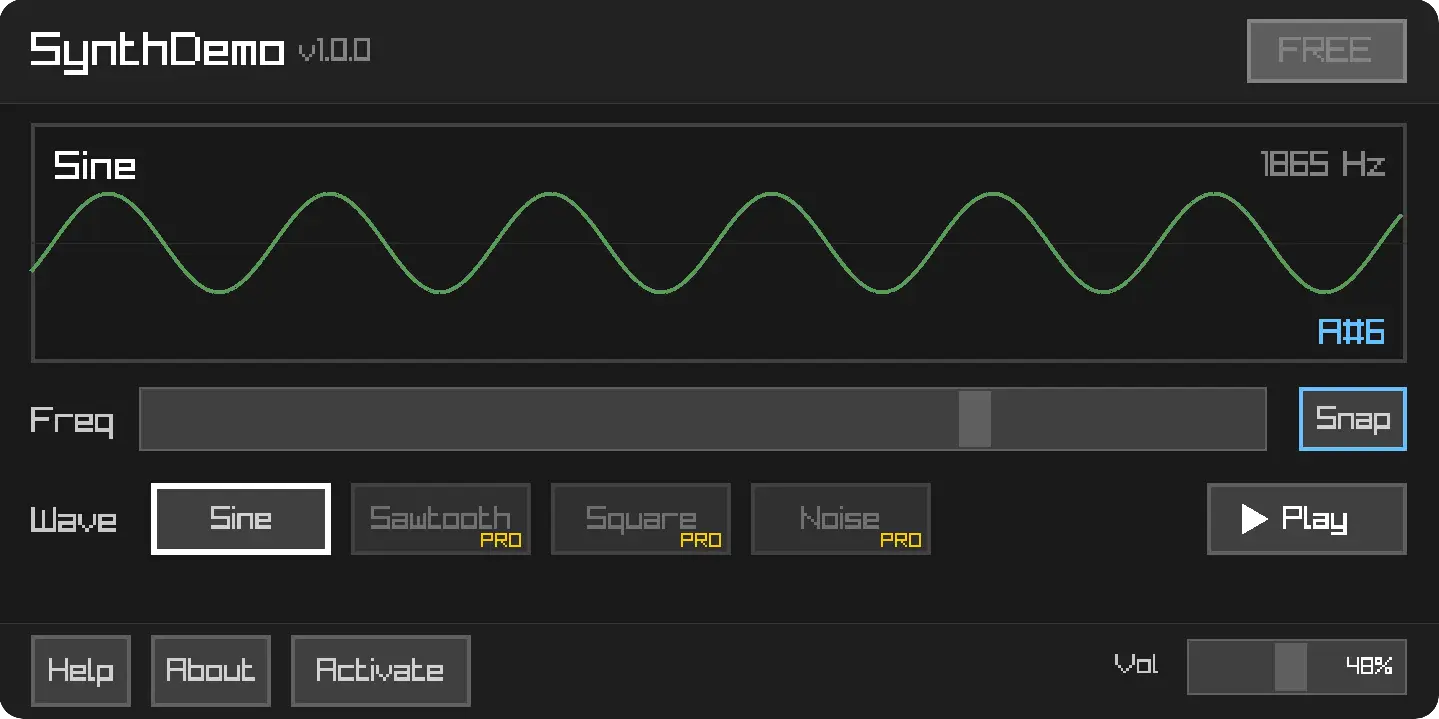
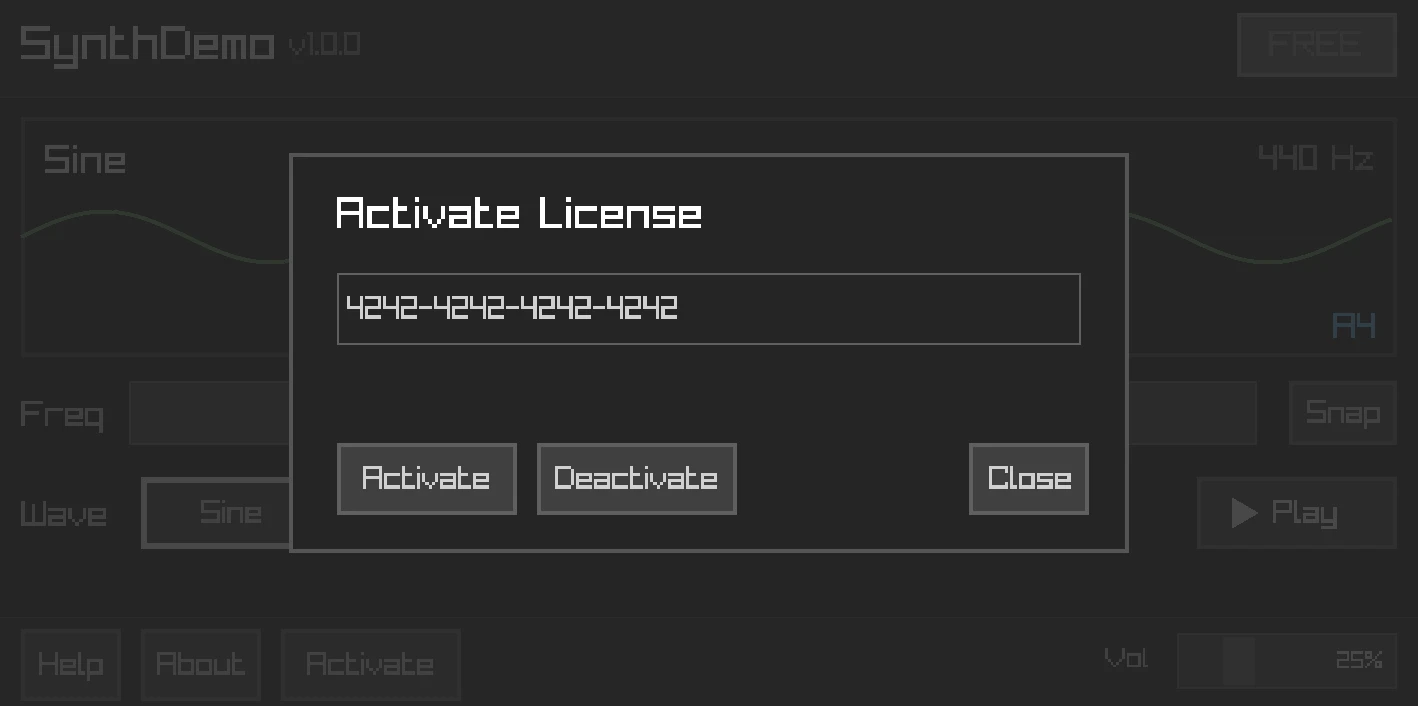
SynthDemo: FREE tier with PRO feature gating and license activation
Building a VST plugin or Unreal game? Use the JUCE adapters, which require the core SDK and OpenSSL, or the native Unreal Engine plugin for online licensing.
Features
- License activation & deactivation - Automatic device fingerprinting
- Online & offline validation - Fingerprint-aware validation with signed offline artifacts
- Machine files - AES-256-GCM + Ed25519 machine files for preferred offline validation
- Entitlement checking -
has_entitlement()andcheck_entitlement() - Local caching - File-based caching with clock tamper detection
- Auto-validation - Background validation at configurable intervals
- Event system - Subscribe to license events
- Thread-safe - All public methods safe from any thread
- Exception-free - Uses
Result<T, Error>pattern
Installation
CMake (FetchContent)
include(FetchContent)

FetchContent_Declare(
    licenseseat
    GIT_REPOSITORY https://github.com/licenseseat/licenseseat-cpp.git
    GIT_TAG        v0.7.0
)
FetchContent_MakeAvailable(licenseseat)

target_link_libraries(your_target PRIVATE licenseseat::licenseseat)
Manual Build
git clone --branch v0.7.0 --depth 1 https://github.com/licenseseat/licenseseat-cpp.git
cd licenseseat-cpp
cmake -B build -DCMAKE_BUILD_TYPE=Release
cmake --build build
sudo cmake --install build
Dependencies
All bundled (no installation needed):
- nlohmann/json – JSON parsing
- cpp-httplib – HTTP client
- PicoSHA2 – SHA-256 hashing
External (the only thing you need to install):
- OpenSSL – for HTTPS, Ed25519 verification, and machine-file AES-256-GCM in the full SDK path
# Ubuntu/Debian
sudo apt install libssl-dev

# macOS (usually pre-installed)
brew install openssl

# Windows
vcpkg install openssl
On macOS, the CMake target links Security.framework automatically. Direct
consumers of the generated single header must link it themselves so TLS can
use roots from the system Keychain.
That's it. Clone and build — no other dependencies to install.
Release Assets
C++ SDK v0.7.0
ships installable macOS ARM64, macOS Intel, Linux x64, and Windows x64
archives, plus licenseseat_single.hpp and SHA256SUMS. The generated single
header still requires compatible nlohmann/json and cpp-httplib headers, plus
OpenSSL for HTTPS and cryptographic verification. Both JUCE adapters require the core SDK and OpenSSL. The native Unreal plugin
provides online licensing through Unreal's own HTTP and JSON modules.
Quick Start
#include <licenseseat/licenseseat.hpp>

int main()
{
    licenseseat::Config config;
    config.api_key = "pk_live_xxxxxxxx";
    config.product_slug = "your-product";

    licenseseat::Client client(config);

    // Validate a license
    auto result = client.validate("XXXX-XXXX-XXXX-XXXX");

    if (result.is_ok()) {
        const auto& validation = result.value();
        if (validation.valid) {
            std::cout << "License is valid!\n";
            std::cout << "Plan: " << validation.license.plan_key() << "\n";
        } else {
            std::cout << "Invalid: " << validation.code << " - " << validation.message << "\n";
        }
    } else {
        std::cerr << "Error: " << result.error_message() << "\n";
    }

    // Check entitlements
    if (client.has_entitlement("pro")) {
        // Enable pro features
    }

    return 0;
}
Integration Guide
Step-by-step guide to integrating LicenseSeat into your C++ application.
1. Get Your Credentials
From your LicenseSeat Dashboard:
- API Key — Go to Settings → API Keys → Copy a restricted
pk_live_*client key. Assume any key embedded in a shipped binary can be extracted. - Product Slug — Go to Products → Click your product → Copy the slug from the URL
Important: Use only a least-privilege
pk_*client key in an application. Keepsk_*, administrator, and server-write keys on trusted servers. Treat end-user license keys as secrets too: keep them out of URLs, logs, crash reports, analytics, and API responses.
2. Add the SDK to Your Project
Option A: CMake FetchContent (recommended)
include(FetchContent)
FetchContent_Declare(
    licenseseat
    GIT_REPOSITORY https://github.com/licenseseat/licenseseat-cpp.git
    GIT_TAG        v0.7.0
)
FetchContent_MakeAvailable(licenseseat)
target_link_libraries(your_target PRIVATE licenseseat::licenseseat)
Option B: Manual
git clone --branch v0.7.0 --depth 1 https://github.com/licenseseat/licenseseat-cpp.git
cd licenseseat-cpp
cmake -B build && cmake --build build
sudo cmake --install build
3. Initialize the Client
#include <licenseseat/licenseseat.hpp>

licenseseat::Config config;
config.api_key = "pk_live_xxxxxxxx";       // Your publishable key
config.product_slug = "your-product";       // From dashboard
config.storage_path = "/path/to/cache";     // Optional: enables persistence
config.app_version = "1.0.0";               // Your app version

licenseseat::Client client(config);
4. Validate the License
auto result = client.validate("XXXX-XXXX-XXXX-XXXX");

if (result.is_ok() && result.value().valid) {
    const auto& license = result.value().license;
    std::cout << "Plan: " << license.plan_key() << "\n";

    // Store the key for future use
    save_license_key("XXXX-XXXX-XXXX-XXXX");
} else if (result.is_ok()) {
    // License exists but invalid
    std::cout << "License issue code: " << result.value().code << "\n";
} else {
    // Network or API error
    std::cerr << "Error: " << result.error_message() << "\n";
}
5. Activate the Device (Optional)
For hardware-locked licenses, activate the device to consume a seat:
std::string device_id = licenseseat::generate_device_id();  // Auto-generated fingerprint
std::string device_name = "User's MacBook Pro";             // Friendly name

auto result = client.activate("LICENSE-KEY", device_id, device_name);

if (result.is_ok()) {
    std::cout << "Activated on device: " << result.value().device_name() << "\n";
} else if (result.error_code() == licenseseat::ErrorCode::SeatLimitExceeded) {
    std::cout << "No seats available. Deactivate another device first.\n";
}
6. Check Features (Entitlements)
Gate features based on the license plan:
// Simple boolean check
if (client.has_entitlement("pro-features")) {
    enable_pro_mode();
}

if (client.has_entitlement("export-pdf")) {
    show_export_button();
}

// Detailed check with expiration info
auto status = client.check_entitlement("beta-access");
if (status.active) {
    if (status.expires_at) {
        show_beta_with_countdown(*status.expires_at);
    } else {
        show_beta_perpetual();
    }
}
7. Enable Offline Support (Optional)
The current C++ SDK is machine-file-first. Set a cache path, explicitly enable bounded network-only fallback, activate online once, and the SDK automatically syncs an encrypted machine file for offline use:
licenseseat::Config config;
config.api_key = "pk_live_xxxxxxxx";
config.product_slug = "your-product";
config.storage_path = "/path/to/cache";
config.offline_fallback_mode = licenseseat::OfflineFallbackMode::NetworkOnly;
config.max_offline_days = 7;

licenseseat::Client client(config);

auto activation = client.activate("LICENSE-KEY");
if (activation.is_ok()) {
    std::cout << "Activated and machine file cached\n";
}

// Later, when offline:
auto restore = client.restore_license();
if (restore.success && restore.status == licenseseat::ClientStatus::OfflineValid) {
    std::cout << "Restored from cached machine file\n";
}
If you need full manual control, fetch and verify the machine file explicitly:
client.activate("LICENSE-KEY");  // Required once for the same fingerprint

auto machine_file = client.checkout_machine_file("LICENSE-KEY").value();
auto verify = client.verify_machine_file(machine_file);

if (verify.is_ok() && verify.value().valid) {
    std::cout << "Offline license verified from machine file\n";
}
Legacy offline tokens still exist for older integrations, but they are no longer the default path. Enable them explicitly only if you still depend on them:
// Keep the pinned key, storage and offline policy configured above.
// Set this before constructing the Client.
config.enable_legacy_offline_tokens = true;
8. Handle License Changes
Subscribe to events for reactive updates:
client.on(licenseseat::events::VALIDATION_SUCCESS, [](const std::any& data) {
    update_ui_licensed();
});

client.on(licenseseat::events::VALIDATION_FAILED, [](const std::any& data) {
    show_license_expired_dialog();
});

// Start background validation (every hour)
client.start_auto_validation("LICENSE-KEY");
Complete Example
#include <licenseseat/licenseseat.hpp>
#include <iostream>

int main() {
    // 1. Configure
    licenseseat::Config config;
    config.api_key = "pk_live_xxxxxxxx";
    config.product_slug = "my-desktop-app";
    config.storage_path = get_app_data_path() + "/license_cache";
    config.app_version = "2.0.0";

    licenseseat::Client client(config);

    // 2. Load saved license key (if any)
    std::string license_key = load_saved_license_key();
    if (license_key.empty()) {
        license_key = show_license_entry_dialog();
    }

    // 3. Validate
    auto result = client.validate(license_key);

    if (result.is_ok() && result.value().valid) {
        save_license_key(license_key);

        // 4. Check what features they have
        bool is_pro = client.has_entitlement("pro");
        bool has_export = client.has_entitlement("export");

        // 5. Launch app with appropriate features
        launch_app(is_pro, has_export);

        // 6. Keep validating in background
        client.start_auto_validation(license_key);
    } else {
        show_license_invalid_dialog(
            result.is_ok() ? result.value().message : result.error_message()
        );
    }

    return 0;
}
Metadata Access
Metadata lets you attach custom key-value data to licenses and entitlements. Use it for customer info, feature limits, configuration, or any app-specific data.
License Metadata
Access metadata from the license object after validation:
auto result = client.validate("LICENSE-KEY");

if (result.is_ok() && result.value().valid) {
    const auto& license = result.value().license;
    const auto& metadata = license.metadata();  // std::map<std::string, std::string>

    // Access specific keys
    if (metadata.count("customer_id")) {
        std::string customer_id = metadata.at("customer_id");
        load_customer_preferences(customer_id);
    }

    if (metadata.count("max_projects")) {
        int max_projects = std::stoi(metadata.at("max_projects"));
        enforce_project_limit(max_projects);
    }

    // Iterate all metadata
    for (const auto& [key, value] : metadata) {
        std::cout << key << " = " << value << "\n";
    }
}
Entitlement Metadata
Each entitlement can have its own metadata:
auto result = client.validate("LICENSE-KEY");

if (result.is_ok() && result.value().valid) {
    // Get all active entitlements
    for (const auto& ent : result.value().license.active_entitlements()) {
        std::cout << "Entitlement: " << ent.key << "\n";

        // Access entitlement-specific metadata
        for (const auto& [key, value] : ent.metadata) {
            std::cout << "  " << key << " = " << value << "\n";
        }

        // Example: Feature limits per entitlement
        if (ent.key == "api-access" && ent.metadata.count("rate_limit")) {
            int rate_limit = std::stoi(ent.metadata.at("rate_limit"));
            configure_api_rate_limit(rate_limit);
        }
    }
}
Offline Metadata
Metadata is included in machine files too:
auto machine_file = client.checkout_machine_file("LICENSE-KEY").value();
auto verify = client.verify_machine_file(machine_file);

if (verify.is_ok() && verify.value().valid && verify.value().payload.has_value()) {
    const auto& payload = *verify.value().payload;

    // Activation metadata captured in the machine file
    if (payload.metadata.count("device_name")) {
        std::cout << "Device name: " << payload.metadata.at("device_name") << "\n";
    }

    // Embedded license metadata and entitlements
    if (payload.license.has_value()) {
        const auto& license = *payload.license;
        if (license.metadata().count("customer_name")) {
            std::cout << "Licensed to: " << license.metadata().at("customer_name") << "\n";
        }
    }
}
If you still rely on legacy offline tokens, metadata is accessible there too through offline_token.token.metadata and offline_token.token.entitlements.
Common Metadata Use Cases
| Use Case | Metadata Key | Example Value |
|---|---|---|
| Customer identification | customer_id |
"cust_123abc" |
| Feature limits | max_projects |
"10" |
| API rate limits | rate_limit |
"1000" |
| White-label branding | company_name |
"Acme Corp" |
| Seat allocation | assigned_seats |
"5" |
| Custom expiration | support_expires |
"2026-12-31" |
Tip: Set metadata when creating licenses via the Dashboard or API. The SDK only reads metadata — modifications require admin access.
Configuration
licenseseat::Config config;

// Required
config.api_key = "pk_live_xxxxxxxx";
config.product_slug = "your-product";

// Optional - API settings
config.api_url = "https://licenseseat.com/api/v1";  // Default
config.timeout_seconds = 30;
config.max_retries = 3;

// Optional - Device identification
config.device_id = "";  // Legacy config name; auto-generates the device fingerprint if empty

// Optional - App info (for telemetry)
config.app_version = "2.1.0";
config.app_build = "42";

// Optional - Offline support
config.signing_public_key = "base64-ed25519-public-key";  // Pre-configure machine-file verification
config.offline_fallback_mode = licenseseat::OfflineFallbackMode::NetworkOnly;
config.max_offline_days = 30;

// Optional - Caching
config.storage_path = "";  // Path for license cache (empty = no persistence)

// Optional - Auto-validation & heartbeat
config.auto_validate_interval = 3600.0;  // Seconds between background validations
config.heartbeat_interval = 300;         // Seconds between heartbeats (5 minutes)
Configuration Options
| Option | Type | Default | Description |
|---|---|---|---|
api_key |
string |
required | Your publishable API key |
product_slug |
string |
required | Product identifier |
api_url |
string |
https://licenseseat.com/api/v1 |
API endpoint |
timeout_seconds |
int |
30 |
HTTP request timeout |
max_retries |
int |
3 |
Retry attempts for failed requests |
device_id |
string |
"" |
Device fingerprint (legacy config name, auto-generated if empty) |
signing_public_key |
string |
"" |
Ed25519 public key for machine files and legacy offline tokens |
offline_fallback_mode |
OfflineFallbackMode |
Disabled |
Automatic offline authority. NetworkOnly is eligible only after a network/transport failure. |
max_offline_days |
int |
0 |
Local offline restore limit in days. 0 disables offline authority. |
app_version |
string |
"" |
Your app version for telemetry |
app_build |
string |
"" |
Your app build number for telemetry |
storage_path |
string |
"" |
Path for license cache (empty = no persistence) |
auto_validate_interval |
double |
3600.0 |
Seconds between auto-validation cycles |
heartbeat_interval |
int |
300 |
Seconds between standalone heartbeats (0 = disabled) |
Automatic offline authority is fail-closed unless the fallback mode is enabled
and max_offline_days is positive. Always is a deprecated compatibility
alias for NetworkOnly; every received HTTP response—including 408, 4xx, and
5xx—and every local protocol or security failure remains authoritative.
Validation
Validation checks whether a license is valid. A successfully parsed validation
decision uses HTTP 200; authentication, transport, server, or protocol failures
may not. First check the outer Result, then check the response's valid
field.
auto result = client.validate("LICENSE-KEY");

if (result.is_ok()) {
    const auto& validation = result.value();

    if (validation.valid) {
        // License is valid and usable
        std::cout << "Valid! Plan: " << validation.license.plan_key() << "\n";
    } else {
        // License exists but isn't valid for use
        // Common codes: expired, revoked, suspended, seat_limit_exceeded
        std::cout << "Code: " << validation.code << "\n";
        std::cout << "Message: " << validation.message << "\n";
    }

    // License data is always available (even when invalid)
    const auto& license = validation.license;
    std::cout << "Status: " << license_status_to_string(license.status()) << "\n";
    std::cout << "Seats: " << license.active_seats() << "/" << license.seat_limit() << "\n";
} else {
    // API error (license not found, network error, auth failed)
    std::cerr << "Validation request failed\n";
}
Note: For hardware-locked licenses, you must provide a device fingerprint. In the current public C++ API that parameter is still named
device_idfor compatibility:auto result = client.validate("LICENSE-KEY", device_id);Without it, validation may return
valid: falsewith codedevice_not_activated.
Async Validation
client.validate_async("LICENSE-KEY", [](licenseseat::Result<licenseseat::ValidationResult> result) {
    if (result.is_ok() && result.value().valid) {
        // License is valid
    }
});
Activation
In v0.7.0, both Activation::id() and Deactivation::activation_id are strings.
Update integer variables and remove std::to_string calls around these fields.
Hosted responses use UUIDs; positive integer identifiers from self-hosted engines
are accepted and normalized without signed overflow.
Activation binds a license to a device, consuming a seat.
auto result = client.activate("LICENSE-KEY", device_id, "My MacBook Pro");

if (result.is_ok()) {
    const auto& activation = result.value();
    std::cout << "Activation ID: " << activation.id() << "\n";
    std::cout << "Device: " << activation.device_name() << "\n";
} else {
    switch (result.error_code()) {
        case licenseseat::ErrorCode::SeatLimitExceeded:
            std::cerr << "No seats available\n";
            break;
        case licenseseat::ErrorCode::DeviceAlreadyActivated:
            std::cerr << "Device already activated\n";
            break;
        default:
            std::cerr << "Error: " << result.error_message() << "\n";
    }
}
Deactivation
Deactivation removes a device from a license, freeing a seat.
auto result = client.deactivate("LICENSE-KEY", device_id);

if (result.is_ok()) {
    std::cout << "Device deactivated\n";
} else if (result.error_code() == licenseseat::ErrorCode::ActivationNotFound) {
    std::cout << "Device was not activated\n";
}
Entitlements
Entitlements are feature flags tied to a license. They allow you to gate specific features without creating separate products.
Simple Check (Boolean)
// Uses cached license data - no network request
if (client.has_entitlement("pro-features")) {
    enable_pro_features();
}

if (client.has_entitlement("beta-access")) {
    show_beta_ui();
}
Detailed Check
auto status = client.check_entitlement("pro-features");

if (status.active) {
    // Entitlement is active
    std::cout << "Feature unlocked!\n";

    // Check expiration (if set)
    if (status.expires_at) {
        auto expires = *status.expires_at;
        auto now = std::chrono::system_clock::now();
        auto days_left = std::chrono::duration_cast<std::chrono::hours>(expires - now).count() / 24;
        std::cout << "Expires in " << days_left << " days\n";
    } else {
        std::cout << "Never expires (perpetual)\n";
    }

    // Access metadata if needed
    if (status.entitlement) {
        for (const auto& [key, value] : status.entitlement->metadata) {
            std::cout << "  " << key << ": " << value << "\n";
        }
    }
} else {
    // Entitlement not active - check reason
    if (status.reason == "no_license") {
        show_activation_screen();
    } else if (status.reason == "not_found") {
        show_upgrade_prompt();  // Feature not in their plan
    } else if (status.reason == "expired") {
        show_renewal_prompt();
    }
}
EntitlementStatus Fields
| Field | Type | Description |
|---|---|---|
active |
bool |
Whether the entitlement is currently active |
reason |
string |
Why inactive: no_license, not_found, expired |
expires_at |
optional<Timestamp> |
Expiration time (empty if perpetual) |
entitlement |
optional<Entitlement> |
Full entitlement data if found |
Entitlements in Validation Response
After validation, entitlements are available on the license object:
auto result = client.validate("LICENSE-KEY");
if (result.is_ok() && result.value().valid) {
    const auto& license = result.value().license;

    std::cout << "Active entitlements:\n";
    for (const auto& ent : license.active_entitlements()) {
        std::cout << "  - " << ent.key;
        if (ent.expires_at) {
            std::cout << " (expires: " << *ent.expires_at << ")";
        } else {
            std::cout << " (perpetual)";
        }
        std::cout << "\n";
    }
}
Offline Entitlement Checking
Entitlements are included in offline machine files too:
auto machine_file = client.checkout_machine_file("LICENSE-KEY").value();
auto verify = client.verify_machine_file(machine_file);

if (verify.is_ok() && verify.value().valid && verify.value().payload.has_value()) {
    const auto& payload = *verify.value().payload;

    if (payload.license.has_value()) {
        for (const auto& ent : payload.license->active_entitlements()) {
            std::cout << "Entitlement: " << ent.key << "\n";
        }
    }

    if (client.check_entitlement("pro-features").active) {
        enable_pro_features();
    }
}
If you still rely on legacy offline tokens, you can read entitlements from offline_token.token.entitlements too.
See Entitlements for more details on setting up and managing entitlements.
Status
Get the current cached license status without making a network request.
auto status = client.get_status();

std::cout << "Valid: " << (status.valid ? "yes" : "no") << "\n";
std::cout << "Code: " << status.code << "\n";
Check API Health
Check the public API's reachability and health:
auto result = client.health();

if (result.is_ok()) {
    std::cout << "API is reachable and healthy\n";
} else {
    std::cerr << "Health check failed: " << result.error_message() << "\n";
}
Returns Result<bool> where a successful result indicates that the public API
is reachable. The health request deliberately omits bearer authentication, so
it does not prove that an API key is present, valid, scoped correctly, or
authorized for the product.
Offline Support
The SDK supports offline validation with encrypted machine files signed using Ed25519. Machine files are the preferred path for new integrations because they are:
- Activation-bound
- Fingerprint-bound
- AES-256-GCM encrypted
- Signed for tamper detection
The public signing key is part of the trust decision. For offline authority after process restart, configure the expected key through trusted application configuration. A key fetched over authenticated transport is suitable for the current process, but a key recovered only from attacker-writable cache storage is deliberately not accepted as a trust anchor.
Preferred Workflow: Machine Files
Pin your organization's key in trusted application configuration. Fetch it during
integration from GET /api/v1/signing_keys/{key_id} and use public_key exactly as
returned: Base64 encoding of 32 raw Ed25519 bytes, not PEM or DER. The endpoint
needs no authentication. Keep the key and its matching ID with the application;
a key supplied by the user alongside a certificate cannot establish trust.
licenseseat::Config config;
config.api_key = "YOUR_PUBLISHABLE_KEY";
config.product_slug = "your-product";
config.storage_path = "/path/to/cache";
config.signing_public_key = "YOUR_BASE64_RAW_ED25519_PUBLIC_KEY";
config.signing_key_id = "YOUR_ORGANIZATION_SIGNING_KEY_ID";
config.offline_fallback_mode = licenseseat::OfflineFallbackMode::NetworkOnly;
config.max_offline_days = 7;

licenseseat::Client client(config);
auto activated = client.activate("LICENSE-KEY");
if (activated.is_error()) throw std::runtime_error(activated.error_message());
// The automatic sync is best effort. Check checkout before claiming offline readiness.
auto machine = client.checkout_machine_file("LICENSE-KEY");
if (machine.is_error()) throw std::runtime_error(machine.error_message());
On the next application run, construct a fresh Client with the same configuration,
cache path and fingerprint, then call restore_license(). Check success;
OfflineValid means the signed cached artifact was verified without server validation.
Successful local activation saves the session identity as of v0.7.0. Earlier SDKs
required a successful online validate() call before session restore.
licenseseat::Client restarted(config);
auto restored = restarted.restore_license();
if (restored.success) {
    std::cout << restored.message << "\n";
}
Setting only storage_path does not enable offline support. Both an enabled fallback
mode and a positive max_offline_days are required. Certificate and license expiry
can shorten that duration. Keys fetched by a Client are retained only in that
process; use the application pin for a later offline startup.
Importing a machine file from curl
Collect the target machine's exact client.fingerprint(). On an online helper,
activate the license for that fingerprint, then request /licenses/machine-file
using the SAME fingerprint and "include": ["license"]. Transfer the value at
data.attributes.certificate to the offline target. Do not use the online helper's
fingerprint or the documentation's example fingerprint.
licenseseat::Client client(config); // trusted key pin from the configuration above
licenseseat::MachineFile imported;
imported.certificate = certificate_text;
auto verified = client.verify_machine_file(imported, "", license_key, client.fingerprint());
if (verified.is_error()) throw std::runtime_error(verified.error_message());
if (!verified.value().valid || !verified.value().payload)
    throw std::runtime_error(verified.value().message);
const auto& payload = *verified.value().payload;
if (payload.license) {
    std::cout << payload.license->plan_key() << "\n";
}
This public API needs neither a private key-ID parser nor a preexisting SDK cache.
It never fetches keys or contacts the network. Direct verification does not import a
session for restore_license(); custom-storage apps reload and verify the certificate
on each startup. Missing include leaves payload.license empty. Wrong keys,
fingerprints, expired claims and modified certificates are rejected.
Legacy Offline Tokens
Legacy offline tokens are still available for compatibility, but only use them when you explicitly need portable JSON tokens for an older integration:
config.enable_legacy_offline_tokens = true;

client.activate("LICENSE-KEY");  // Offline tokens also require an existing activation
auto token = client.generate_offline_token("LICENSE-KEY").value();
std::string token_json = licenseseat::json::offline_token_to_json(token);
Machine File Payload
| Field | Type | Description |
|---|---|---|
license_key |
string |
License key embedded in the encrypted payload |
fingerprint |
string |
Device fingerprint the machine file was issued for |
fingerprint_components |
object |
Structured fingerprint metadata captured during checkout |
iat / exp / nbf |
int64 |
Issued-at, expiry, and not-before timestamps |
ttl |
int64 |
Machine-file lifetime in seconds |
grace_period |
int64 |
Extra offline grace after expiry |
kid |
string |
Signing key ID |
license |
object |
Embedded license snapshot with entitlements and metadata |
Long-Lived Offline Deployments
Machine files are finite by design, but the server can intentionally allow long TTLs for deployments that are rarely connected:
- consumer apps: usually 30-45 days
- professional/field deployments: often 90-365 days
- intentionally air-gapped systems: sometimes multi-year TTLs
The automatic fallback/restore policy is capped at 30 days in this SDK, regardless
of a longer server-issued TTL. A longer certificate TTL does not override
max_offline_days. Direct certificate verification is a lower-level API: apps
choosing it must define their own permitted offline window. Longer disconnected
periods delay visibility of revocations and entitlement changes.
Auto-Validation
Background validation at configurable intervals.
// Configure interval (in seconds)
config.auto_validate_interval = 3600.0;  // Every hour

licenseseat::Client client(config);

// Start auto-validation
client.start_auto_validation("LICENSE-KEY");

// Check if running
if (client.is_auto_validating()) {
    std::cout << "Auto-validation is active\n";
}

// Stop when done
client.stop_auto_validation();
Events
Subscribe to license events for reactive updates.
#include <licenseseat/events.hpp>

// Subscribe to validation success
auto sub1 = client.on(licenseseat::events::VALIDATION_SUCCESS, [](const std::any& data) {
    std::cout << "License validated successfully!\n";
});

// Subscribe to validation failure
auto sub2 = client.on(licenseseat::events::VALIDATION_FAILED, [](const std::any& data) {
    std::cout << "License validation failed\n";
});

// Subscribe to machine-file ready
auto sub3 = client.on(licenseseat::events::MACHINE_FILE_READY, [](const std::any& data) {
    std::cout << "Machine file cached\n";
});

// Later: cancel subscriptions
sub1.cancel();
sub2.cancel();
sub3.cancel();
Available Events
| Event | Description |
|---|---|
LICENSE_LOADED |
License data loaded from cache |
ACTIVATION_START |
Activation request starting |
ACTIVATION_SUCCESS |
Device activated successfully |
ACTIVATION_ERROR |
Activation failed |
VALIDATION_START |
Validation request starting |
VALIDATION_SUCCESS |
License validated successfully |
VALIDATION_FAILED |
License validation returned invalid |
VALIDATION_ERROR |
Validation request failed (network, etc.) |
VALIDATION_OFFLINE_SUCCESS |
Cached machine file (or legacy token) verified successfully |
VALIDATION_OFFLINE_FAILED |
Offline verification failed |
DEACTIVATION_START |
Deactivation request starting |
DEACTIVATION_SUCCESS |
Device deactivated successfully |
DEACTIVATION_ERROR |
Deactivation failed |
NETWORK_ONLINE |
Network connectivity restored |
NETWORK_OFFLINE |
Network connectivity lost |
HEARTBEAT_SUCCESS |
Heartbeat acknowledged by server |
HEARTBEAT_ERROR |
Heartbeat request failed |
AUTOVALIDATION_CYCLE |
Auto-validation cycle completed |
AUTOVALIDATION_STOPPED |
Auto-validation stopped |
MACHINE_FILE_READY |
Machine file cached |
MACHINE_FILE_VERIFIED |
Machine file verified |
OFFLINE_TOKEN_READY |
Legacy offline token generated |
OFFLINE_TOKEN_VERIFIED |
Legacy offline token verified |
SDK_RESET |
SDK state reset |
Error Handling
The SDK uses a Result<T, Error> pattern instead of exceptions.
auto result = client.validate("LICENSE-KEY");

if (result.is_ok()) {
    auto& validation = result.value();
    // Success - check validation.valid for license validity
} else {
    // Error - network, auth, or API error
    std::cerr << "Error: " << result.error_message() << "\n";

    switch (result.error_code()) {
        case licenseseat::ErrorCode::NetworkError:
            // No network connectivity
            break;
        case licenseseat::ErrorCode::LicenseNotFound:
            // Invalid license key
            break;
        case licenseseat::ErrorCode::AuthenticationFailed:
            // Invalid API key
            break;
        case licenseseat::ErrorCode::SeatLimitExceeded:
            // Too many activations
            break;
        // ... handle other cases
    }
}
Error Codes
| Code | Description |
|---|---|
Success |
Operation completed successfully |
NetworkError |
HTTP request failed (no connectivity) |
ConnectionTimeout |
Request timed out |
SSLError |
SSL/TLS error |
InvalidLicenseKey |
License key format is invalid |
LicenseNotFound |
License key not found in system |
LicenseExpired |
License has expired |
LicenseRevoked |
License has been revoked |
LicenseSuspended |
License is suspended |
LicenseNotActive |
License is not active |
LicenseNotStarted |
License hasn't started yet |
SeatLimitExceeded |
Maximum activations reached |
ActivationNotFound |
Device activation not found |
DeviceAlreadyActivated |
Device is already activated |
ProductNotFound |
Product slug not found |
AuthenticationFailed |
Invalid or missing API key |
PermissionDenied |
API key lacks required permissions |
ServerError |
Server-side error (5xx) |
SigningNotConfigured |
Offline signing not configured |
InvalidSignature |
Cryptographic signature invalid |
FileError |
File read/write error |
Telemetry
When telemetry_enabled is true (the default), the SDK includes the following
optional telemetry on supported licensing requests:
| Field | macOS | Windows | Linux |
|---|---|---|---|
sdk_name |
cpp |
cpp |
cpp |
sdk_version |
Yes | Yes | Yes |
os_name |
macOS |
Windows |
Linux |
os_version |
kern.osproductversion |
RtlGetVersion |
uname |
platform |
native |
native |
native |
device_model |
hw.model |
Registry BIOS | /sys/class/dmi |
device_type |
desktop |
desktop |
desktop/server |
architecture |
arm64/x64 (compile-time) |
arm64/x64 |
arm64/x64 |
cpu_cores |
hardware_concurrency |
hardware_concurrency |
hardware_concurrency |
memory_gb |
hw.memsize |
GlobalMemoryStatusEx |
/proc/meminfo |
locale |
LANG env |
LANG env |
LANG env |
language |
2-letter code | 2-letter code | 2-letter code |
timezone |
/etc/localtime |
GetTimeZoneInformation |
/etc/localtime |
screen_resolution |
CGDisplay |
GetSystemMetrics |
DRM subsystem |
app_version |
From config | From config | From config |
app_build |
From config | From config | From config |
Set config.telemetry_enabled = false to omit the optional telemetry object.
Core licensing still sends the license/product context and stable fingerprint,
and the server records successful request activity and the source IP. Machine
fingerprints, raw fingerprint components used for machine-file checkout, and
environment diagnostics can be linked device data; do not describe the flow as
anonymous merely because the canonical fingerprint is hashed.
See Telemetry for the full field reference.
Unreal Engine Plugin
A complete UE plugin using native FHttpModule and FJsonObject. No external dependencies.
auto* LicenseSeat = GetGameInstance()->GetSubsystem<ULicenseSeatSubsystem>();

FLicenseSeatConfig Config;
Config.ApiKey = TEXT("pk_live_xxxxxxxx");
Config.ProductSlug = TEXT("your-game");
LicenseSeat->InitializeWithConfig(Config);

LicenseSeat->ValidateAsync(TEXT("LICENSE-KEY"),
    FOnValidationComplete::CreateLambda([](const FLicenseValidationResult& Result)
    {
        if (Result.bValid)
        {
            // License valid
        }
    }));
Location: integrations/unreal/LicenseSeat/
Features:
- Blueprint support via
UFUNCTION/UPROPERTY/USTRUCT GameInstanceSubsystemfor automatic lifecycle management- Async API (non-blocking)
- Auto-validation timer
- Online validation, activation and deactivation
The native Unreal plugin does not implement machine-file verification. Use the core C++ SDK when offline verification is required.
JUCE: VST / AU / AAX
JUCE-friendly adapters delegate HTTP, JSON, storage and cryptography to the core
C++ SDK. Link licenseseat::licenseseat and OpenSSL. The Standalone class name
is retained for compatibility; it is not an independent protocol implementation.
#include "LicenseSeatJuceStandalone.h"

LicenseSeatJuceStandalone license("pk_live_xxxxxxxx", "your-plugin");

// Audio thread safe (reads std::atomic)
void processBlock(juce::AudioBuffer<float>& buffer, juce::MidiBuffer&)
{
    if (!license.isValid())
    {
        buffer.clear();
        return;
    }
    // Process audio
}

// Async validation (callback on message thread)
license.validateAsync("LICENSE-KEY", [](auto& result)
{
    if (result.valid)
    {
        // Update UI
    }
});
Location: integrations/juce/Source/LicenseSeatJuceStandalone.h
Features:
- Single header file
std::atomic<bool>for lock-free status checks in audio threadMessageManager::callAsyncfor thread-safe UI callbacks- Multi-instance safe (no global state)
Note: Both JUCE adapters link the core SDK and OpenSSL. Package and test those dependencies with your plugin; the adapter does not remove them.
Thread Safety
All public methods are thread-safe. The SDK uses internal mutexes to protect shared state.
// Safe from multiple threads
std::thread t1([&client]() {
    client.validate("KEY");
});

std::thread t2([&client]() {
    bool valid = client.is_valid();
});
For audio plugins, isValid() uses std::atomic<bool> for lock-free reads in real-time contexts.
Platform Support
| Platform | Compiler | Status |
|---|---|---|
| Linux | GCC 9+, Clang 10+ | Supported |
| macOS | Apple Clang 12+ (ARM & Intel) | Supported |
| Windows | MSVC 2019+ | Supported |
Device Identification
The SDK automatically generates a stable fingerprint per device:
- macOS: IOKit Platform UUID
- Windows: Machine GUID from registry
- Linux:
/etc/machine-id, D-Bus machine ID, DMI product UUID, or hostname fallback
The canonical value sent for seat binding is the first 128 bits of a SHA-256 hash of the preferred signal. When the SDK checks out a machine file using its default fingerprint, it also sends structured fingerprint components (which can include the underlying machine identifier and hostname) for server-side matching and diagnostics. Treat both the hash and those components as device data in the host application's privacy disclosures and retention policy.
Reset
Clear all cached data (license, machine files, legacy offline tokens, etc.).
client.reset();Demo App
The SDK includes SynthDemo, a compact audio synthesizer that demonstrates real-world licensing integration:
- Feature gating — FREE tier (sine wave) vs PRO (sawtooth, square, noise)
- License activation — Modal dialog with activate/deactivate
- Session restore — Cached license on app restart
- Admin view — Runtime status, heartbeat, machine file caching, entitlements
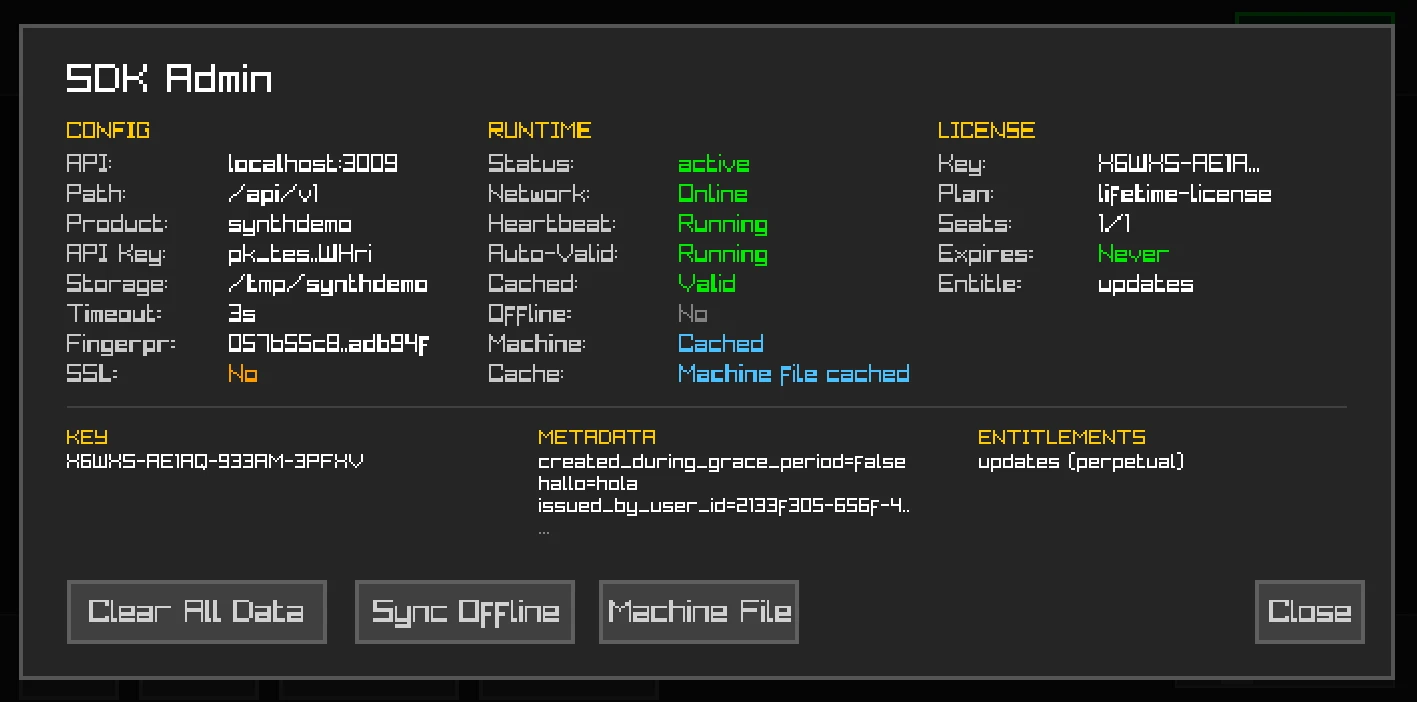
Admin view: runtime status, auto-validation, machine file caching, and entitlements
Built with raylib + raygui. See the demo README for build instructions.
Next Steps
- C# SDK - For .NET applications
- Swift SDK - For Apple platforms
- Offline Licensing - Air-gapped validation
- API Reference - Direct API access
- C++ SDK on GitHub - Source code, issues, and contributions