Turn your Tauri app into a real business with licensing
You built something people want. Now learn how to add licensing to protect it from piracy, sell it and monetize it, distribute it to your customers, and get paid every time someone uses it.
No credit card required
How to sell and monetize your Tauri app
You've built a Tauri desktop app worth selling, and you're now looking into licensing so your app doesn't get pirated. This guide covers the complete setup: from accepting payments to Tauri app, to license keys, to distribution. By the end, you'll have:
- Payment integration with Gumroad, LemonSqueezy, or Stripe
- Desktop app license key validation running in Rust (not bypassable JavaScript)
- Device limits so one key can't be shared with 100 people
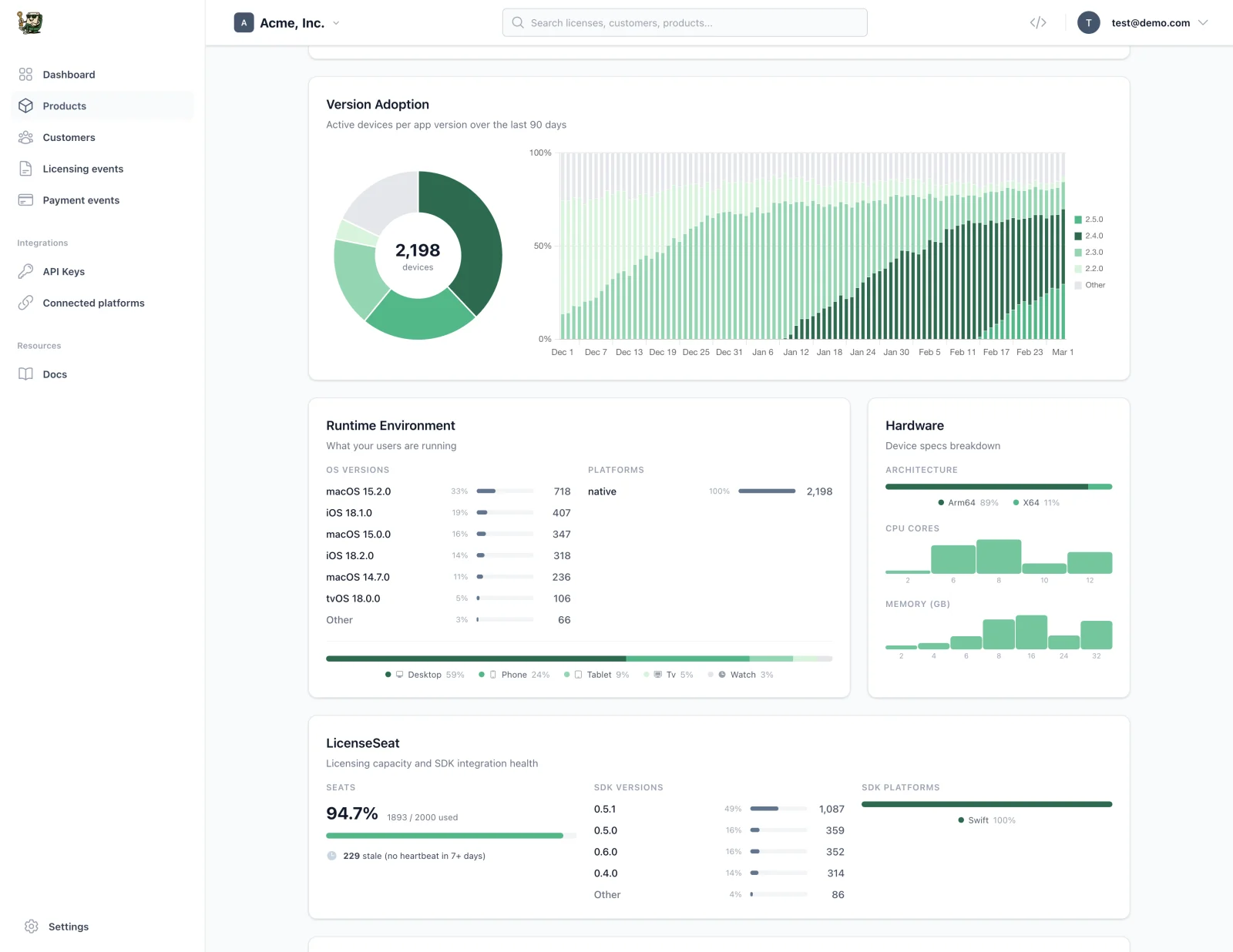
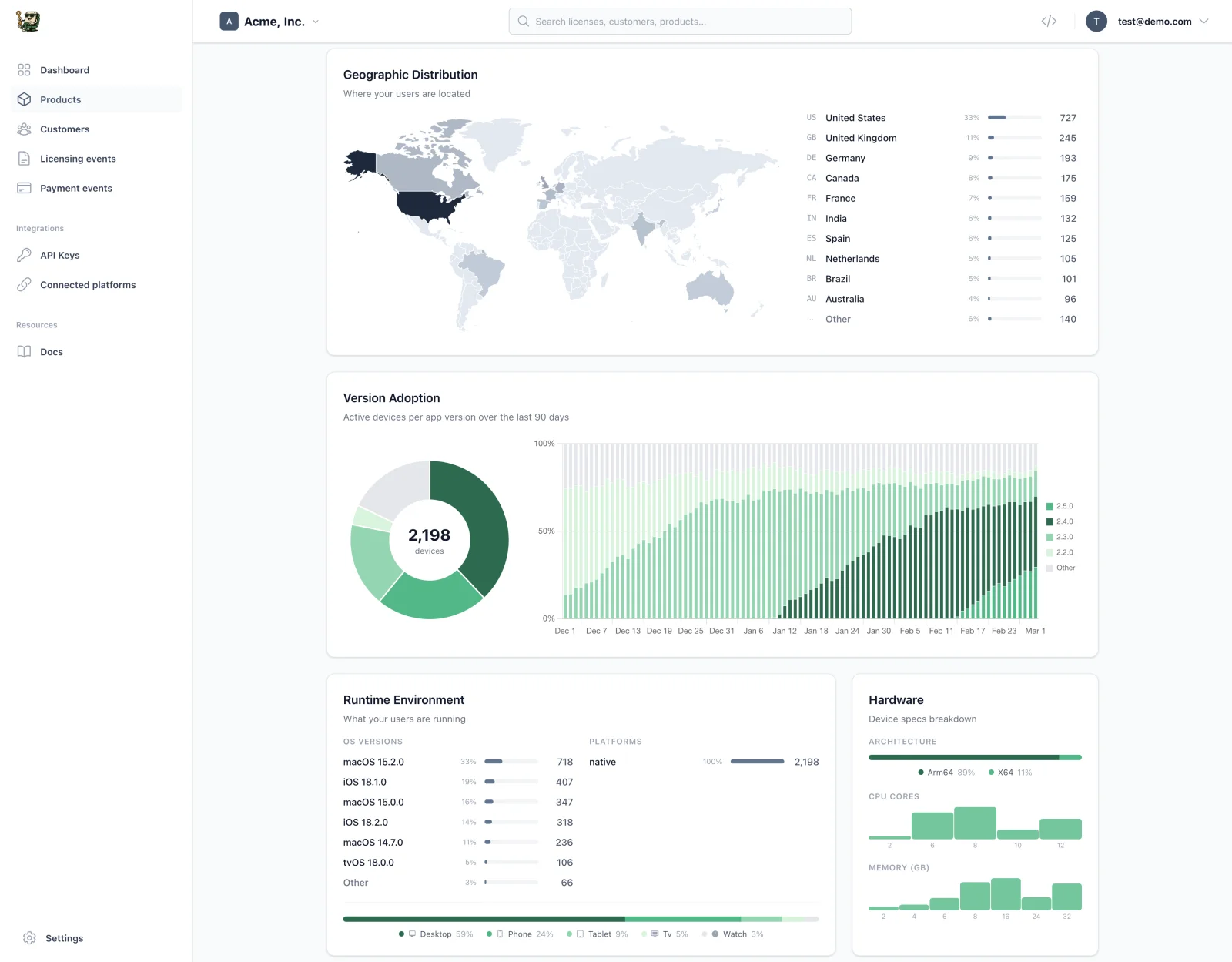
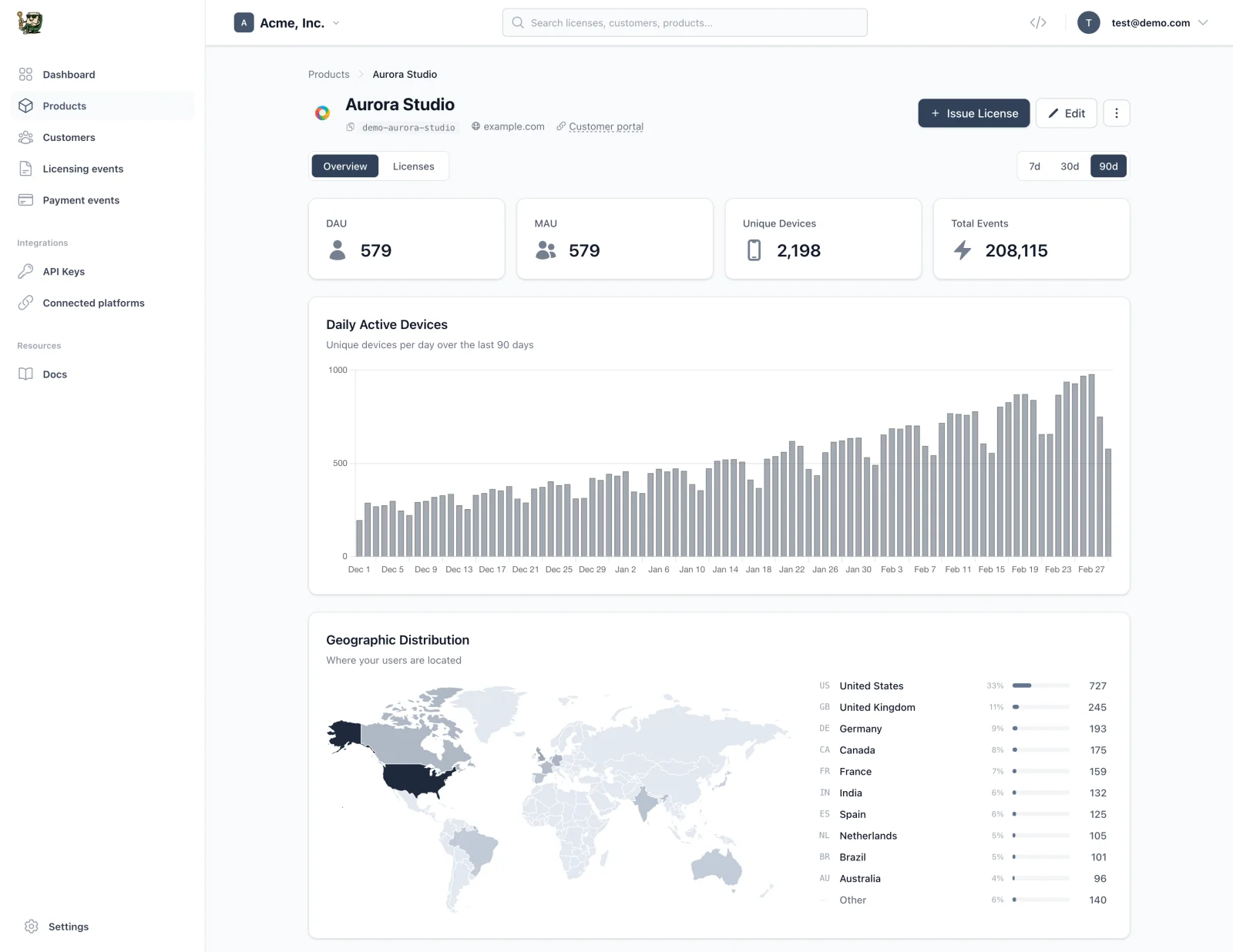
- Real-time dashboard showing who's using your app and where
- Tauri auto update delivery gated to paying customers only
- Tauri code signing for macOS notarization and Windows SmartScreen
No backend to build. No database to manage. Just a few lines of Rust to monetize your desktop app.
Once you're set up, you'll know exactly who's using your Tauri app, where they are, and which version they're running, without writing any tracking code.
How licensing for Tauri apps works
It's very simple! After each purchase, a Tauri app license key gets issued and sent to your customer, automatically. If you want, we can also take care of your Tauri app distribution. LicenseSeat handles all moving parts for you.
The technical details
You saw the flow above. Here's what's happening under the hood when you monetize a desktop app with the Tauri framework.
Where the code lives in Tauri
The Tauri framework lets you build cross-platform desktop apps with a Rust backend and web frontend. Licensing touches both:
| Layer | Responsibility |
|---|---|
| Rust (secure) | Validates keys, stores activation in system keychain, handles offline caching |
| Frontend (UI only) | Shows "enter key" screen, calls Rust commands, displays feature gates |
All security-critical logic runs in Rust. The frontend just renders UI.
DIY vs. managed service
Build it yourself: Server, database, key generation, validation logic, device tracking, admin dashboard. 2-4 weeks + ongoing maintenance.
Use a service: Drop in an SDK, call activate(), done. 30 minutes.
We'll use LicenseSeat because your time is better spent on your app. But the code patterns work with any backend.
Choose where to sell your Tauri app
Pick a payment platform. LicenseSeat integrates with all of them to automatically generate and deliver license keys when someone buys.




Also connect Shopify and Polar. Other payment systems need a custom integration using our API.
Add licensing to your Tauri app
LicenseSeat handles the hard stuff: secure key generation, device fingerprinting, offline validation, and abuse detection. You just add a few lines of Rust.
Connect your payment processor
Connect a supported sales platform and link your products to issue licenses on purchase. Other platforms need an API integration.
Add the SDK to your Tauri app
Drop in our Rust SDK. One activate() call is all you need.
Ship and get paid
Every purchase gets a unique license key. Every activation is tracked. You keep 100% of revenue.
Tauri tutorial: Adding a desktop app license key
Here's the actual code. This Tauri tutorial walks through the complete setup, and you can use it as a reference for your own Tauri app examples.
Step 1: Install the packages
In your Tauri project directory:
# Add the Tauri plugin (Rust side)
cargo add tauri-plugin-licenseseat --manifest-path src-tauri/Cargo.toml

# Add the frontend bindings (JavaScript/TypeScript)
npm add @licenseseat/tauri-plugin
Step 2: Configure the plugin
Add your API credentials to src-tauri/tauri.conf.json:
{
  "plugins": {
    "licenseseat": {
      "apiKey": "ls_live_your_api_key_here",
      "productSlug": "your-product-slug",
      "autoValidateInterval": 3600,
      "heartbeatInterval": 300,
      "offlineFallbackMode": "allow_offline",
      "maxOfflineDays": 7,
      "telemetryEnabled": true,
      "debug": false
    }
  }
}
What these settings do:
apiKey: Your LicenseSeat API key (get it from your dashboard)productSlug: Identifies which product this app belongs toautoValidateInterval: Recheck the license every hour (3600 seconds)heartbeatInterval: Send a ping every 5 minutes for real-time seat trackingofflineFallbackMode: How to handle offline scenarios (network_only,allow_offline, oroffline_first)maxOfflineDays: Grace period for offline use (7 days recommended)telemetryEnabled: Collect anonymous usage stats (OS, version, locale)debug: Enable console logging for development
Step 3: Register the plugin
In src-tauri/src/main.rs:
fn main() {
    tauri::Builder::default()
        .plugin(tauri_plugin_licenseseat::init())
        .run(tauri::generate_context!())
        .expect("error while running tauri application");
}
That's it for the Rust side. The plugin handles:
- Secure license storage in the system keychain
- Automatic device fingerprinting
- Background validation and heartbeats
- Offline artifact caching (encrypted, signed machine files bound to the activation and device)
Step 4: Add permissions
In src-tauri/capabilities/default.json, add the plugin permissions:
{
  "identifier": "default",
  "windows": ["main"],
  "permissions": [
    "core:default",
    "licenseseat:default"
  ]
}
Step 5: Frontend integration
Now wire up the UI. Here's a complete example:
import {
  activate,
  getStatus,
  hasEntitlement,
  deactivate
} from '@licenseseat/tauri-plugin';

// Check license status on app startup
async function checkLicense(): Promise<boolean> {
  try {
    const status = await getStatus();

    if (status.status === 'active') {
      return true; // Licensed, show full app
    }

    if (status.status === 'not_activated') {
      return false; // Not licensed, show activation UI
    }

    if (status.status === 'expired') {
      return false; // Expired, show renewal prompt
    }

    // Handle suspended state
    return false;
  } catch (error) {
    console.error('License check failed:', error);
    return false;
  }
}

// When user submits their license key
async function activateLicense(licenseKey: string): Promise<{
  success: boolean;
  license?: { deviceId: string; planKey: string };
  error?: string;
}> {
  try {
    const license = await activate(licenseKey);

    return {
      success: true,
      license: {
        deviceId: license.deviceId,
        planKey: license.planKey
      }
    };
  } catch (error: any) {
    // Error is a string message from the backend
    const message = typeof error === 'string' ? error : (error.message || 'Activation failed');

    if (message.includes('limit')) {
      return {
        success: false,
        error: 'This license is already active on too many devices. Deactivate another device first.'
      };
    }

    if (message.includes('expired')) {
      return {
        success: false,
        error: 'This license has expired. Please renew your subscription.'
      };
    }

    if (message.includes('invalid')) {
      return {
        success: false,
        error: 'Invalid license key. Please check and try again.'
      };
    }

    if (message.includes('network')) {
      return {
        success: false,
        error: 'Network error. Please check your connection and try again.'
      };
    }

    return {
      success: false,
      error: message
    };
  }
}

// Check if user has access to a specific feature
async function canUseProFeature(): Promise<boolean> {
  return await hasEntitlement('pro-features');
}

// Deactivate this device (frees up a seat)
async function deactivateDevice(): Promise<void> {
  await deactivate();
  // Show activation UI again
}
Example: License activation component (React)
import { useState } from 'react';
import { activate, getStatus } from '@licenseseat/tauri-plugin';

export function LicenseActivation({ onActivated }: { onActivated: () => void }) {
  const [licenseKey, setLicenseKey] = useState('');
  const [error, setError] = useState<string | null>(null);
  const [loading, setLoading] = useState(false);

  async function handleSubmit(e: React.FormEvent) {
    e.preventDefault();
    setLoading(true);
    setError(null);

    try {
      await activate(licenseKey.trim());
      onActivated();
    } catch (err: any) {
      // Error is a string from the backend
      setError(typeof err === 'string' ? err : (err.message || 'Activation failed'));
    } finally {
      setLoading(false);
    }
  }

  return (
    <div className="license-activation">
      <h2>Enter your license key</h2>
      <p>You can find your license key in the email you received after purchase.</p>

      <form onSubmit={handleSubmit}>
        <input
          type="text"
          value={licenseKey}
          onChange={(e) => setLicenseKey(e.target.value)}
          placeholder="LS25-XXXX-XXXX"
          disabled={loading}
        />

        <button type="submit" disabled={loading || !licenseKey.trim()}>
          {loading ? 'Activating...' : 'Activate'}
        </button>
      </form>

      {error && <p className="error">{error}</p>}

      <p className="help">
        Don't have a license? <a href="https://your-store.com">Buy now</a>
      </p>
    </div>
  );
}
Feature gating with entitlements
Use entitlements for tiers (Free vs Pro) or time-limited access. The most common pattern: an updates entitlement that expires after 1 year. Customers keep the app forever but need to renew for new versions.
import { hasEntitlement, checkEntitlement } from '@licenseseat/tauri-plugin';

// Check if user can receive updates (common for perpetual licenses)
if (await hasEntitlement('updates')) {
  checkForUpdates();
} else {
  showRenewalPrompt(); // "Renew to get the latest features"
}

// Feature tier check
if (await hasEntitlement('pro-features')) {
  enableProFeatures();
}

// Detailed check with reason
const result = await checkEntitlement('cloud-sync');
if (result.active) {
  enableCloudSync();
} else {
  // result.reason tells you why: 'not_found', 'expired', 'no_license'
  showUpgradePrompt(result.reason);
}
Distribute your Tauri app with auto-updates
Host your builds on our global CDN, serve automatic updates, and gate downloads to paying customers. No S3 buckets to manage.
Upload once, serve everywhere
Upload your Tauri app builds and we handle global distribution via CDN. Fast downloads for all your users.
Automatic updates
Sparkle-compatible release feeds for macOS. JSON manifests for custom updaters. Your users always get the latest version.
Gated downloads
Downloads require a valid license. No more sharing direct links. Cryptographically signed tokens ensure only paying customers get access.
What the LicenseSeat SDK handles for you
You don't need to build any licensing infrastructure. The Tauri plugin handles everything out of the box:
| Feature | Included | Configuration |
|---|---|---|
| Online license validation | ✓ | Automatic on activate/validate |
| Device fingerprinting | ✓ | Automatic, stable across reinstalls |
| Seat limits | ✓ | Set in your LicenseSeat dashboard |
| Offline grace period | ✓ |
maxOfflineDays in config (default: 0, set to 7 recommended) |
| Entitlements (feature flags) | ✓ | Define in dashboard, check with hasEntitlement()
|
| Background re-validation | ✓ |
autoValidateInterval (default: 1 hour) |
| Heartbeat for real-time tracking | ✓ |
heartbeatInterval (default: 5 min) |
The defaults are sensible. Most Tauri apps ship with just the API key and product slug configured. Tweak settings later based on real user feedback.
Tauri app distribution and auto updates
LicenseSeat handles distribution for your Tauri app. When a customer purchases, they get a download link and license key automatically. For updates, gate them behind the updates entitlement (shown in the code section above) so expired licenses keep the version they paid for but don't receive new releases.
The Tauri updater plugin integrates with your entitlement checks. Call hasEntitlement('updates') before checking for updates, and show a renewal prompt if the entitlement has expired.
What successful Tauri apps do (famous Tauri app examples)
Cap: Open source Loom alternative with 17k+ GitHub stars. Free locally, Cap Pro at ~$8/month for cloud features. Commercial license required for business use ($29/year or $58 lifetime). Built custom licensing with their own API endpoints and activation logic.
Yaak: API client with ~18k stars. Free for personal use, $79/year individual or $149/user/year for businesses. 30-day trial, then license required for work use. Built custom licensing with a dedicated Tauri plugin (yaak-license) and their own license server.
GitButler: Git client with 19k+ stars. Free to use, Fair Source license (MIT after 2 years). VC-backed, monetizing through cloud features. No license key system.
Spacedrive: Cross-platform file manager with 37k+ GitHub stars. Open source core, funded by investors. No licensing yet.
The DIY licensing trap: We looked at Cap and Yaak's source code. Each spent weeks building custom licensing: their own Tauri plugins, API endpoints, activation flows, trial logic. Hundreds of lines of code. And they still don't have offline validation with cryptographic signatures, automatic heartbeats for real-time seat tracking, entitlements for feature gating, or stable device fingerprinting. The LicenseSeat SDK gives you all of that in ~10 lines of code. Ship your app, not your licensing infrastructure.
Common patterns:
- Price range: $29-99 one-time, or $5-15/month
- Most use perpetual licenses (one-time payment)
- 2-3 device limit is standard
Common Tauri app licensing mistakes
These are common pitfalls when licensing Tauri apps, and how the LicenseSeat SDK handles each one for you.
Shipping without any protection. Even basic license keys stop the vast majority of casual sharing. → The LicenseSeat SDK gives you license key validation in one line of code. No excuse to ship unprotected.
Validating only in the frontend. JavaScript is bypassable. Anyone with DevTools can patch your checks. → The Tauri plugin runs all validation in Rust. The frontend only renders UI; the real checks happen in your secure backend.
Blocking users who go offline. Laptops get used on planes. Studios have unreliable internet. → The Tauri plugin checks out an Ed25519-signed, AES-256-GCM-encrypted machine file after activation and verifies it locally with your pinned signing key. Set maxOfflineDays: 7 and offline users stay happy.
Forgetting about the activation UX. The moment someone pays and opens your app, they should feel good, not frustrated. → The LicenseSeat SDK returns clear error codes (seat_limit_exceeded, expired, revoked) so you can show helpful, specific messages.
Not testing the revocation flow. What happens when you revoke a key? → Revoke from your LicenseSeat dashboard, the SDK picks it up on next validation, and your app can react via the event system (licenseseat://validation-failed).
Obsessing over determined pirates. Perfect DRM doesn't exist. If someone wants to crack your app badly enough, they will. → The LicenseSeat SDK makes buying easy and pirating annoying. That's the 95% solution. Don't over-engineer this.
Tauri app distribution requirements
Tauri code signing requirements
Before you ship, you need code signing certificates. Without Tauri code signing, your app shows scary warnings that kill conversion.
macOS:
- Apple Developer Program membership ($99/year)
- Developer ID Application certificate
- Notarization (submitting to Apple for automated security review)
- Tauri handles all of this through
tauri.conf.json. See the Tauri signing docs
Windows:
- EV Code Signing certificate ($300-600/year from DigiCert, Sectigo, SSL.com)
- Without this, SmartScreen shows "Windows protected your PC" and most users won't click through
- Standard (non-EV) certificates work but build reputation slower
- Tauri supports Windows signing. See the Tauri Windows signing docs
Linux:
- No code signing required
- Ship as AppImage for maximum compatibility, or .deb/.rpm for package managers
- Tauri builds all formats automatically
Pro tip: If you only have a Mac, start with macOS and Linux builds. Add Windows once you have paying customers funding the certificate purchase. The EV cert cost pays for itself after ~5 sales of a $60 app.
Tauri-specific requirements
Rust toolchain: Stable Rust 1.70+ (or later)
Tauri version: Tauri 2.0+ (the plugin uses v2 APIs)
System keychain access: The LicenseSeat SDK stores activation data in the system keychain (Keychain on macOS, Credential Manager on Windows, libsecret on Linux). No special permissions needed.
Summary: How to sell a Tauri app
To recap how to monetize desktop apps built with the Tauri framework:
- Set up payments: Connect Gumroad, LemonSqueezy, or Stripe to generate license keys on purchase
- Add the LicenseSeat SDK: Install
tauri-plugin-licenseseatand configure your LicenseSeat API key - Validate on launch: Call
activate()with the customer's Tauri license key - Gate features: Use entitlements to control access to Pro features or updates
- Sign your builds: Complete Tauri code signing for macOS and Windows
- Distribute: Host your builds and configure the Tauri updater for auto updates
That's the complete flow for desktop app monetization. You're now ready to sell your Tauri app.
More than just license keys
LicenseSeat gives you everything you need to protect and sell your Tauri app.
Stop losing sales to piracy
Pirates are stealing up to 20% of your launch revenue. Most indie Tauri apps get cracked in the first week. LicenseSeat adds friction and control, without hurting honest users.
- Prevent key sharing & license abuse
- Enforce per-device or per-seat limits
- Revoke stolen or abused keys instantly
- Offline activation supported

Integrate with your existing payment processor
Keep selling through Stripe, Gumroad, Lemon Squeezy, Paddle, Shopify or Polar. Turn linked purchases into license keys and enable automatic email delivery to send them to your buyers. Other payment systems connect through our API. No markup, 0% revenue share.
- Connect with Stripe, Gumroad, Shopify, Paddle & more
- Webhooks and API for custom integrations
- Provider-specific setup guides and API documentation
- Zero revenue share or markup fees

Start selling your Tauri app today
Add licensing in 15 minutes. Protect your code, deliver license keys automatically, and get paid. Start your free trial in seconds—no credit card required.
Start free trial